
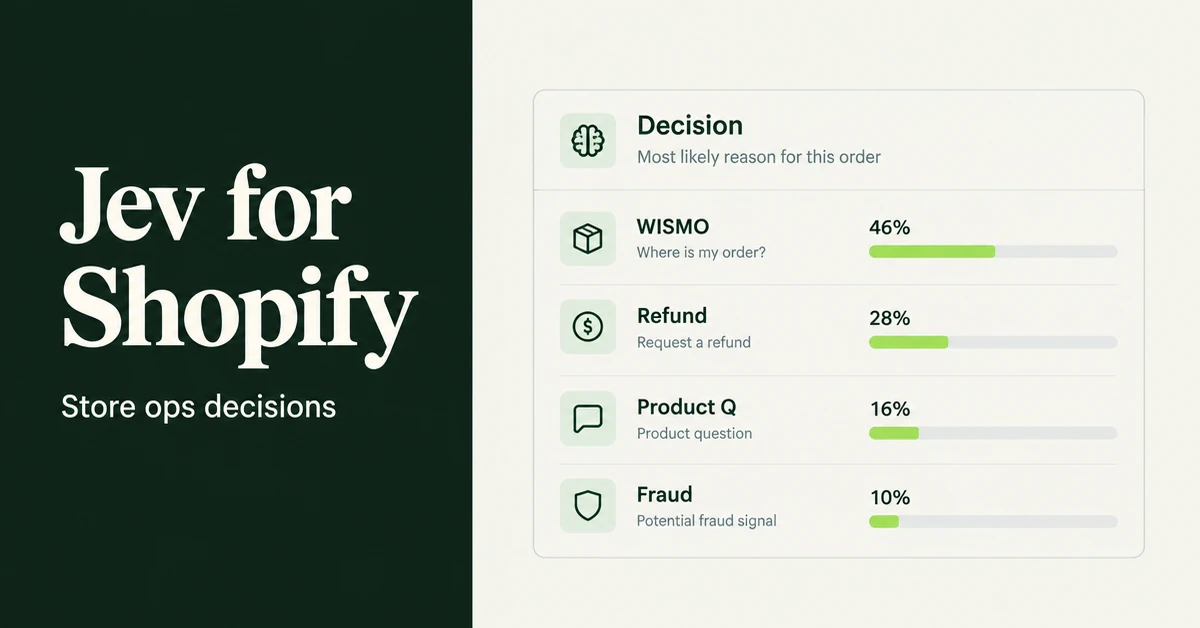
If you need to know how to use Jev AI Shopify workflows in 2026, start with one idea: Jev is not a storefront chatbot and it does not write product copy. It is TypeSafe AI's first System One model. You send program state plus typed questions, and it returns calibrated probabilities your code can branch on.
That makes it a back-office decision layer for Shopify store ops, agencies, and anyone wiring automations. Use it to route tickets, triage refunds, score review quality, and guardrail LLM agents before they touch money or inventory. For open-ended copy and photos, use an LLM stack instead. For customer-facing chat replies, use a chat layer. Jev sits underneath those tools as the fast classify-and-score step.
TypeSafe launched Jev around 15 September 2026 under founder Diogo Almeida (ex-OpenAI, RLHF). Early access is on a waitlist at typesafe.ai. The same model also shows up as typesafe/jev on Cloudflare Workers AI, on Vercel AI Gateway as typesafe-ai/jev, and in LangChain as TypeSafeClassifier.
What is Jev AI, and why does it matter for Shopify store ops?
Jev is a structured-decision model. You define Noul (yes/no), Choice, and Score questions up front. It answers all of them in parallel with probabilities and confidence, instead of generating free text.
TypeSafe's launch post puts end-to-end response time at roughly 70ms to 500ms for System One shaped queries, with company-listed pricing around $0.042 per million input tokens and output treated as free. Speed and cost multipliers such as "up to 200x faster" are TypeSafe's own workflow-eval claims. Treat them as company-reported, then measure against your ticket volume and latency budget.
For a Shopify merchant, the useful frame is: most inbox and refund pain is classification. You already know the buckets. You need a cheap, typed probability so your automation can auto-handle the clear cases and escalate the rest. That is the opposite of asking a chat model to invent a polite paragraph every time.
If you already use a back-office teammate for files and scoped API work, keep that lane. Our guide on how to use Grok Bot with Shopify for store ops covers research, CSVs, and custom-app tokens. Jev is the decision call those workflows can add when the next step is "which queue?" not "write a draft."
How do you call Jev from a Shopify automation without turning it into a chatbot?
You build a small server-side step: assemble state from Shopify Admin API fields, declare typed questions, call Jev, then apply thresholds in your own code. Jev never becomes the customer-facing reply engine.
A practical shape for an SMB or agency:
- Trigger on a new Inbox message, a return request webhook, a review import batch, or a proposed agent tool call.
- Build state as structured JSON: ticket text, order status, fulfillment flags, refund policy snippet, SKU tags. Prefer fields over prose.
- Ask several questions in one request (Noul + Choice + Score). Parallel questions barely change latency according to TypeSafe and LangChain write-ups.
- Read probabilities and confidence. Auto-act only above your bar (for example 0.90). Soft-queue 0.70 to 0.90. Human review below that.
- Log the decision. Calibrate thresholds on two weeks of labeled tickets before you trust auto-refunds.
Access paths in 2026:
- TypeSafe early access / waitlist at typesafe.ai (primary product docs and launch details).
- Cloudflare Workers AI model id
typesafe/jevwith Noul, Choice, and Score examples. - Vercel AI Gateway model id
typesafe-ai/jevvia the evaluate API. - LangChain
TypeSafeClassifierfor agent middleware (routing and tool guardrails).
Do not paste full customer addresses, card data, or staff passwords into state. Summarize: order id, fulfillment status, ticket intent text, policy excerpt. Same hygiene rule you use for any AI ops stack in our guide on how to use AI to run a Shopify store.
How can Jev AI Shopify routing cut support ticket chaos?
Use a Choice question for ticket type, plus Noul flags for urgency and fraud risk, then route by confidence. Clear WISMO goes to status automation. Unclear refund-plus-threat messages go to a human.
Example question set for one Inbox message:
- Choice: WISMO, refund_return, product_question, fraud_risk, other.
- Noul: Is the customer asking for money back right now?
- Noul: Does the message show chargeback or "lawyer" language?
- Score: Frustration level (calm / frustrated / very angry).
Threshold pattern that works for growing stores:
- WISMO probability ≥ 0.92 and fraud Noul < 0.20 → hand to order-status automation (or your existing chat order lookup).
- refund_return ≥ 0.90 → open a refund triage workflow (next section), do not auto-refund yet.
- product_question ≥ 0.90 → FAQ / catalog answer path.
- Anything with confidence under ~0.75, or fraud Noul ≥ 0.50 → human queue first.
This is where Jev and chat layers split cleanly. Customer-facing replies still need grounded order data and a conversational model. If you already automate WISMO answers on the storefront, keep that path. Our playbook on how AI chat reduces WISMO tickets is the reply layer. Jev is the router that decides which tickets even try that path versus refund or fraud review.
One organic stack note: a tool like RagChat can own the customer-facing chat window and order lookup, while Jev scores and routes the tickets that still land in a shared inbox. Do not ask Jev to invent the tracking sentence. Do not ask the chat model to be your only classifier when you need calibrated probabilities.
How do you triage refund and return requests against real order state?
Pass the ticket plus the order and policy as structured state, then ask Noul questions that map to your refund rules. Auto-approve only when both policy and order fields support it at high confidence.
Cloudflare's Workers AI docs show a refund-shaped example: ticket message, order charges, and a refund policy string, with Noul questions such as "does the message request a refund?" and "does policy support this refund given the charges?" Steal that pattern for Shopify:
- State includes order financial status, fulfillment status, delivery date, item tags (final sale?), and your policy excerpt.
- Noul: refund requested?
- Noul: within return window?
- Noul: item marked final sale?
- Noul: possible duplicate charge?
- Score: goodwill risk if we say no.
Action rules:
- High confidence that refund is requested, within window, not final sale → draft a refund for human click, or auto-refund only if you already accept that risk on low-value SKUs.
- Duplicate-charge Noul high → priority finance queue.
- Outside window or final sale high → send policy template, offer store credit only if your playbook allows.
- Mixed signals → human. Do not let a probability become a silent Admin API refund.
TechCrunch's coverage of Jev stresses the same product idea: probabilities let software automate the clear cases and escalate coin-flips. That is the merchant version of calibrated decisions, not "AI that feels empathetic."
How should you score review quality or import flags without inventing app features?
Run Jev as a pre-publish filter on review text and metadata you already import. Flag spam, off-topic rants, and policy risks. Keep your review app as the system of record for display and star ratings.
Useful Score / Noul set for an import batch or moderation queue:
- Noul: Is this about the product you sell?
- Noul: Does it look like marketing spam or a competitor dump?
- Noul: Does it include personal data or hate speech?
- Score: Usefulness for other shoppers (low / medium / high).
Publish or queue based on thresholds. Do not claim a specific review app "has Jev built in" unless that vendor documents it. This article does not invent Wise Reviews features. The method is: text in, quality flags out, your existing review workflow still owns storage and widgets.
How do you put Jev guardrails in front of Sidekick-style or custom Shopify agents?
Classify the proposed action before it runs. Block or require approval when risk scores are high. Let cheap, reversible reads pass.
Shopify Sidekick is the in-admin commerce assistant. Merchants also build custom agents and automations that call Admin API scopes. LangChain documents Jev middleware patterns for model routing and for checking risky tool calls before execution. Port that idea to Shopify ops:
- State: proposed tool name, target resources (product ids, theme files, refund amount), staff role.
- Noul: Is this irreversible (delete, refund, publish theme)?
- Noul: Does this spend money or change live prices?
- Choice: allow / require_approval / deny.
Pair this with scoped custom-app tokens. A guardrail that says "deny delete" is useless if the token can still delete. For broader agent patterns on Shopify, see AI agents for Shopify and smart automation. Jev is the cheap pre-check those agents can call on every write.
Agentic Storefronts and other customer-facing Shopify AI channels are a different surface. They sell in AI chats. Jev does not replace catalog syndication. It can still sit in your back-office when an automation proposes a bulk price edit after an agentic channel spike.
Most Shopify "AI ops" installs a chatbot and hopes the inbox shrinks. The ticket that wastes your Tuesday afternoon is usually a classification problem. Score it first. Chat second.
When should you not use Jev AI with Shopify?
Skip Jev for open-ended copy, creative work, and customer-facing chat replies. Use an LLM or a dedicated chat product for those jobs. Use Jev when the output must be a typed decision your code can trust.
Do not use Jev when:
- You need a product description, email body, or theme copy. That is string generation.
- You need a polite tracking reply with order fields woven into sentences. That is grounded chat.
- You need brand-new strategy, creative campaigns, or photo concepts.
- You cannot define the answer options in advance. If the label set is fuzzy, fix the taxonomy first.
Do use Jev when:
- You have clear buckets and thresholds.
- Latency must stay under a second inside a webhook or agent loop.
- You need probabilities, not a paragraph.
- You want a second model to watch an LLM agent's tool calls.
Primary sources worth bookmarking: TypeSafe's System One and Jev launch post, TechCrunch's developer reaction piece, LangChain's harness guide, and Cloudflare's typesafe/jev model page.
How do agencies wire Jev into client Shopify ops without overpromising?
Sell a decision layer with measured thresholds, not a magic inbox replacement. Document the label set, the confidence bars, and who still clicks refund.
Agency-friendly delivery checklist:
- One shared taxonomy per client (WISMO, refund_return, product_question, fraud_risk, other). Do not invent ten micro-labels on day one.
- A staging store or a tag-only mode for the first two weeks so routing cannot move money.
- A written escalation matrix: which staff role owns fraud, which owns goodwill refunds.
- A monthly calibration report: precision on auto-routes, false escalations, and tickets still untagged.
Price the work as ops engineering, not as "AI chatbot setup." Merchants who already bought chat still need a classifier when messages spill into email, Instagram DMs forwarded to Inbox, or a shared helpdesk. Jev fits that gap. Chat still owns the live bubble.
Keep client credentials scoped. Prefer a custom app with read_orders and whatever write scopes the approved actions need. Rotate tokens when staff leave. Log every auto-decision with the raw probabilities so you can defend a bad week of refunds with data, not vibes.
What should a Shopify SMB ship in the first two weeks?
Ship one router on Inbox, then one refund triage path, with human approval on every money move. Measure precision before you raise automation.
- Week 1: Label 100 recent tickets into WISMO / refund / product / fraud / other. Call Jev offline on those states. Tune thresholds until false auto-routes are rare.
- Week 1: Wire the router to tag or folder tickets only. No auto-replies yet.
- Week 2: Add refund triage that drafts notes for staff. Still no silent Admin API refunds.
- Week 2: Add a guardrail on any custom agent that can write products or issue refunds.
- Ongoing: Recalibrate monthly. Taxonomy drifts when you add a new product line or a 3PL.
If your store is still under 100 tickets a month, you can skip custom code at first. Export tickets to a sheet, call Jev in a small script from Cloudflare or Vercel, and paste tags back by hand for a week. The goal is calibrated thresholds, not architecture theater. Once the numbers hold, move the same questions into a webhook.
That is how to use Jev AI with Shopify without confusing it for Magic, Sidekick, or storefront chat. Keep generative tools for drafts. Keep chat for customers. Put Jev on the decisions that used to be brittle if-statements and expensive LLM classifiers.
Related Articles
How to Use Grok Bot with Shopify (Back-Office Guide for 2026)
How to use Grok Bot with Shopify for store ops: research, copy, and CSVs first, then a custom app token. Skip the admin login; use a scoped API token.

How to Use AI to Run a Shopify Store in 2026 (Copy, Photos, and Admin)
How to use AI to run a Shopify store after launch: write copy, generate product photos, then stop doing titles, tags, CSVs, and email drafts yourself.

AI Chatbot for Shopify: How to Automate Customer Support and Increase Sales
Learn how an AI chatbot for Shopify automates customer support, recovers abandoned carts, and boosts sales with 24/7 replies and smart product upsells.

WISMO tickets can eat up to 50% of a growing Shopify store's support inbox. See how AI chat connected to real order data auto-answers them 24/7, for free.

AI agents for Shopify are changing how merchants run their stores. Learn what they do, which tools are actually worth it, and how to start automating in 2026.

How to Set Up Live Chat and AI Customer Support for a New Shopify Store (2026 Checklist)
Learn how to set up live chat and AI customer support for a new Shopify store, step by step, with the best AI app to automate support around the clock.