
How to Migrate Magento Customers to Shopify (CSV, Passwords, and Orders)

You can migrate Magento customers to Shopify as names, emails, addresses, tags, and marketing consent. You cannot bring Magento password hashes, store credit, wishlists, or reward points. Shopify will not decrypt another platform's login secret, and no CSV column will change that.
This page is the accounts job only. For catalog, configurables, reviews, and 301s, use the Magento to Shopify migration guide for 2026. Import products first, then customers, then orders, matching the Shopify migration checklist.
StoreLeads counted 103,381 live Magento stores as of 28 Aug 2026, and 1,579 merchants left Magento in the 90 days before that snapshot. Adobe Commerce 2.4.6 standard support ended on 11 Aug 2026. The storefront move is already happening. The login move is the part most teams treat as an afterthought.
What Magento Customer Data Actually Lands on Shopify?
Names, emails, phone numbers, default addresses, tags, notes, tax-exempt flags, and email marketing status can land. Magento passwords, store credit, reward points, wishlists, and native customer-group pricing cannot.
Shopify's customer CSV import is a profile loader, not an identity clone. The Email column must exist. Total Spent and Total Orders are ignored on import because Shopify only counts orders placed on that store. Order history is a separate job, covered below.
What usually transfers cleanly:
- Identity: first name, last name, email, company, phone
- Default address: street, city, region, country, zip
- Consent: Magento newsletter opt-in mapped to Accepts Email Marketing as yes or no
- Segmentation: Magento customer groups written as Shopify tags such as wholesale or vip
- Notes: Magento customer_id, website code, and any flag you still need for support
What stays behind, or needs a second tool:
- Passwords: Magento password hashes are not a Shopify login. Every buyer sets a new password or uses Shopify's one-time email code.
- Store credit and reward points: Magento's Customer Finances export is not Shopify store credit. Rebuild balances in a gift-card or loyalty app, or write them off.
- Wishlists: Magento wishlist tables are not in the customer CSV. Ask buyers to rebuild, or use a wishlist app import if you actually have a file.
- Group prices and shared catalogs: Magento customer-group pricing is not a Shopify tag. Rebuild true B2B as companies, locations, and catalogs. Loyalty tiers stay as tags. Basic, Grow, and Advanced cap B2B catalogs at 3. Plus lifts that cap and can assign catalogs directly to companies.
A product URL importer will not close this gap. Migratify copies product content, images, variants, and prices from a public page. It does not import customers, orders, or reviews. Keep accounts on Shopify's customer CSV, Matrixify, or a dedicated Magento-to-Shopify data service.
How Do You Export Magento Customers for a Shopify Import?
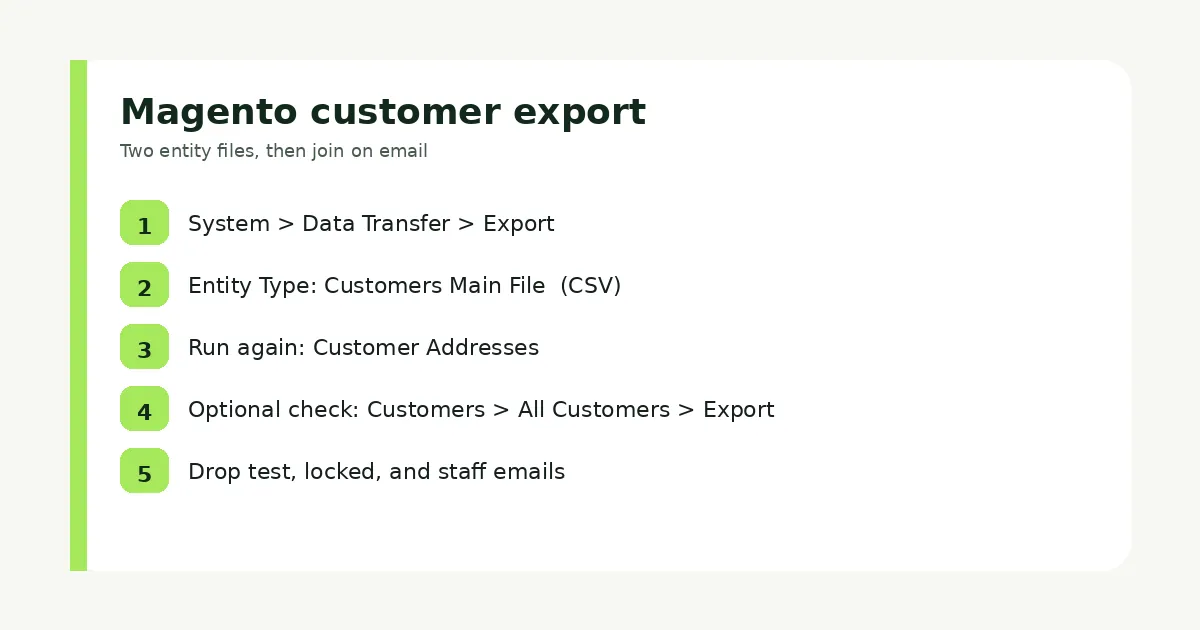
Export two Magento files, then join them on email. Use System > Data Transfer > Export with Entity Type set to Customers Main File, then run it again for Customer Addresses.
Adobe lists those two entities on the official data export screen. The main file holds name, email, group, website, and account flags. Addresses live in a second CSV. One file is not the whole customer.
Do this:
- In Magento admin, go to System > Data Transfer > Export.
- Set Entity Type to Customers Main File, leave the format as CSV, and click Continue. The job is asynchronous. The file lands in var/export (or import_export/export if remote storage is on).
- Run the same screen again with Entity Type set to Customer Addresses.
- Optional grid dump: Customers > All Customers, then Export as CSV, per Adobe's customer grid docs. Use it as a sanity check, not as your only file. It is a flattened view, not the two-entity export.
- Filter out test accounts, locked accounts, and staff emails before you map. Magento's Account Lock column is a security flag, not a Shopify field.
If you run more than one Magento website, export per website or tag the website code in Notes. Shopify has one customer pool per store. The same email on two Magento websites becomes one Shopify profile, or a skipped duplicate, depending on the importer. Decide which website wins before you upload.
How Do You Map Magento Customer Columns to Shopify's CSV?
Rename Magento headers to Shopify's customer CSV names, then join the address file onto Email. Shopify accepts UTF-8, requires the Email column, and rejects files larger than 15 MB, so split big Magento lists.
Download Shopify's customer CSV template from Customers > Import and treat that header row as law. Headers are not case sensitive. Values in Email can be blank, but the column itself cannot be missing, per Shopify's import docs. Oversize files fail with a 15 MB error on the CSV troubleshooting page.
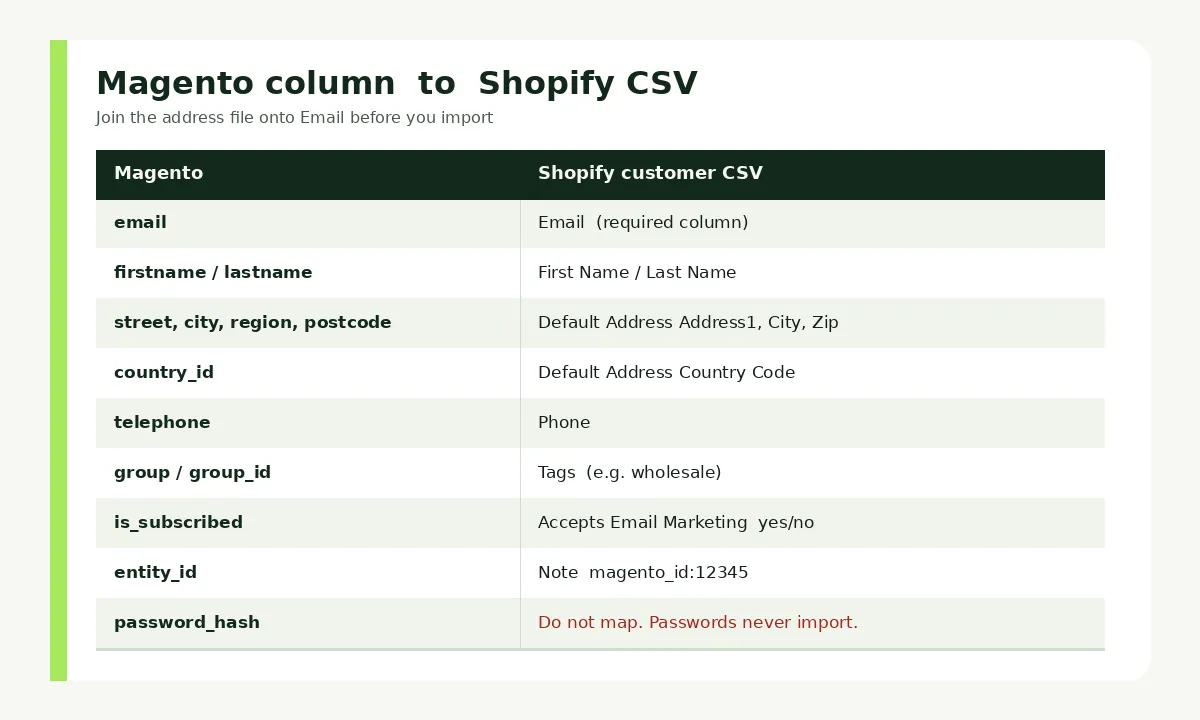
Use this as the working sheet:
- firstname / lastname > First Name / Last Name
- email > Email
- telephone on the address file > Phone, or Default Address Phone if you keep it on the address
- street, city, region, postcode, country_id > Default Address Address1, City, Province Code, Zip, Country Code. Country must be a real ISO country. Magento's "US" is fine. A custom "USA " with a trailing space is not.
- company > Company
- group_id or customer group code > Tags. Wrap multiple tags in quotes, for example "wholesale,magento". Shopify has no Magento-style customer groups on a standard plan.
- is_subscribed or newsletter > Accepts Email Marketing as yes or no. Only write yes when Magento stored an opt-in. A Magento "General" group is not consent.
- taxvat > Note, or Tax Exempt if you actually exempt that buyer. Do not mark every VAT number as tax exempt.
- entity_id (Magento customer id) > Note, as magento_id:12345. Support will need it when a Magento order ticket shows up after launch.
Drop date of birth unless you have a legal reason to keep it. Adobe already flags full birth dates as a privacy risk on the customer grid. Year of birth in a metafield is enough if you still personalize.
Phone numbers need a country code. Magento stores often hold local 10-digit numbers. Shopify is stricter. Prefix them in the sheet before import, or the row fails.
If you have never built a Shopify CSV, the product file is a different template. Use how to import products to Shopify from a CSV for the catalog. Do not paste customer rows into the product importer.
How Do You Migrate Magento Customers to Shopify Without Their Old Passwords?
You migrate Magento customers to Shopify as inactive profiles, then you ask them to sign in with a new password or a one-time email code. Magento hashes never become Shopify logins, on CSV or on a paid migrate app.
Shopify states that you cannot migrate customer passwords from another online store using a CSV. After import, you invite buyers to create a new password, or you turn on Shopify's newer customer accounts so they sign in with a 6-digit code instead.
The password field is a trap. Magento hashes will never become Shopify logins, and no migration app can decrypt them for you. Treat login as a launch-day email, not a CSV column, and you keep the account. Treat it as a missing import field, and you spend a week hunting a column that does not exist.
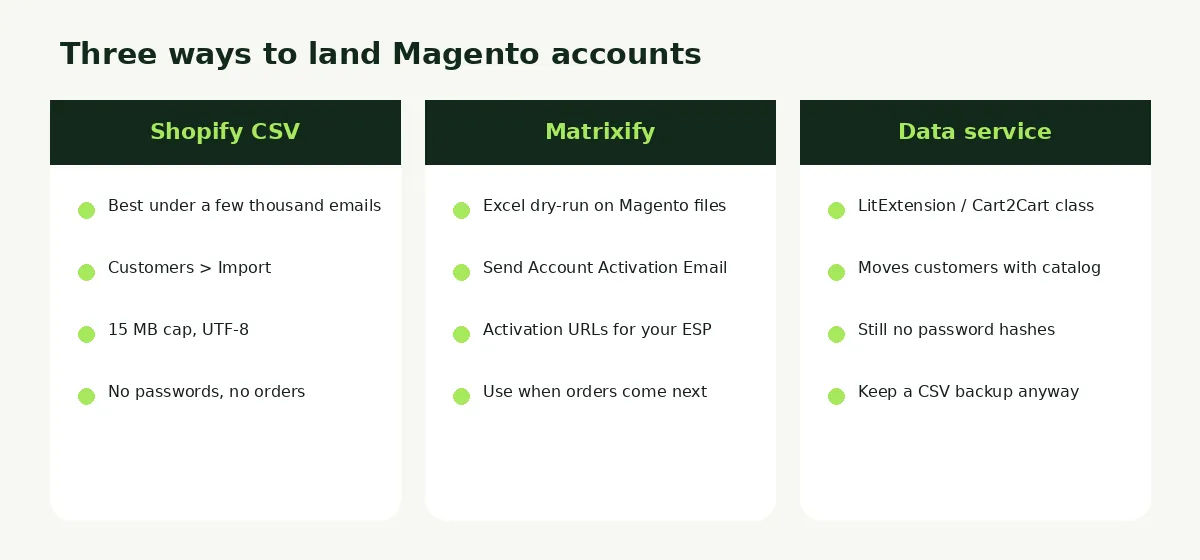
Pick one of three methods. None of them is best overall. Match the method to list size and whether you also need historical orders.
Method 1: Shopify customer CSV
For a few thousand clean emails, native import is enough.
- Finish the mapped UTF-8 CSV. Keep it under 15 MB. Split if you must.
- In Shopify admin, go to Customers > Import, add the file, and import.
- Spot-check 20 profiles: name, address, tag, and Accepts Email Marketing.
- Do not send account invites yet unless you are already on the new domain.
If you use Shopify customer accounts (the newer, passwordless version), buyers enter an email and get a one-time 6-digit code. A password is not required. Sign-in sessions persist for up to 365 days. That is often cleaner than a bulk "reset your password" campaign, as long as your sender domain actually delivers Shopify's code email.
If you stay on legacy customer accounts, buyers still need an email-and-password login. Send Shopify's account invite, or export activation URLs and send them from your ESP. Subject lines that say the password changed beat "we upgraded the site."
Method 2: Matrixify (spreadsheet control)
Use Matrixify when the Magento export is messy, you want Excel dry-runs, or you will also import orders later. Matrixify can read Magento customer files and output its own template. On import, set Send Account Activation Email to TRUE only on launch day. That fires Shopify's default invite, the same one as Send account invite on a customer profile, per Matrixify's customer columns.
You can also export Activation URLs and send them from Klaviyo or Mailchimp with your own template. Generating new URLs expires the old ones. Do that once, on purpose.
Method 3: Magento-to-Shopify data services
LitExtension, Cart2Cart, and similar services will move customer records as an entity next to products and orders. They still cannot move passwords. Demo the login on a sample store before you pay. Keep your mapped CSV as backup. If a configurable SKU or a duplicate email breaks the match, you fix it in the sheet instead of waiting on a ticket.
A store migration app that only copies products will skip this entire section. That gap is documented in what a Shopify store migration app does not move.
How Do You Attach Magento Order History to the New Shopify Accounts?
Import orders after customers, and match them on email. Shopify's customer CSV will not import order history, Total Spent, or Total Orders.
That limit is in Shopify's own customer CSV help. Historical Magento orders need Matrixify, a Magento-to-Shopify data service, or the Admin API. Native admin has no "import orders" button next to Customers > Import.
Run the sequence in this order:
- Products, with Magento SKUs intact, so line items can match. See the product CSV guide linked above if you are on files.
- Customers, with the same emails Magento stored on those orders.
- Orders, limited to the history you still refund, exchange, or look up in support. Older years can stay in a Magento database backup.
Guest Magento checkouts are the usual hole. Those emails may not be in Customers Main File. If you want those people in Shopify, pull unique emails from Magento orders and add them as customers before the order import. If you skip that, the order can still land, but it will not sit on a customer profile you can invite.
Imported Magento orders are history. Refunds, edits, and payment capture often do not behave like orders placed on Shopify. Confirm that with your import tool on a 20-order test. Pause Klaviyo, review-request, and fulfillment apps so a historical import does not email "thanks for your order" to 2019 buyers.
Reviews are not customer records. Magento review tables need their own CSV into a review app. That job lives in how to import Magento reviews to Shopify.
What Should You Tell Magento Buyers Before They Try to Log In?
Tell them the storefront URL changed and their Magento password will fail, then send the invite or point them at the new one-time code login on cutover day. Do this before DNS flips, not after the first 200 "my account was hacked" tickets.
Magento login URLs such as /customer/account/login and /customer/account/forgotpassword sit in years of emails and bookmarks. 301 them to Shopify's account login. The mapping belongs on the same sheet as product redirects. Use how to set up 301 redirects after a Shopify migration for the CSV format.
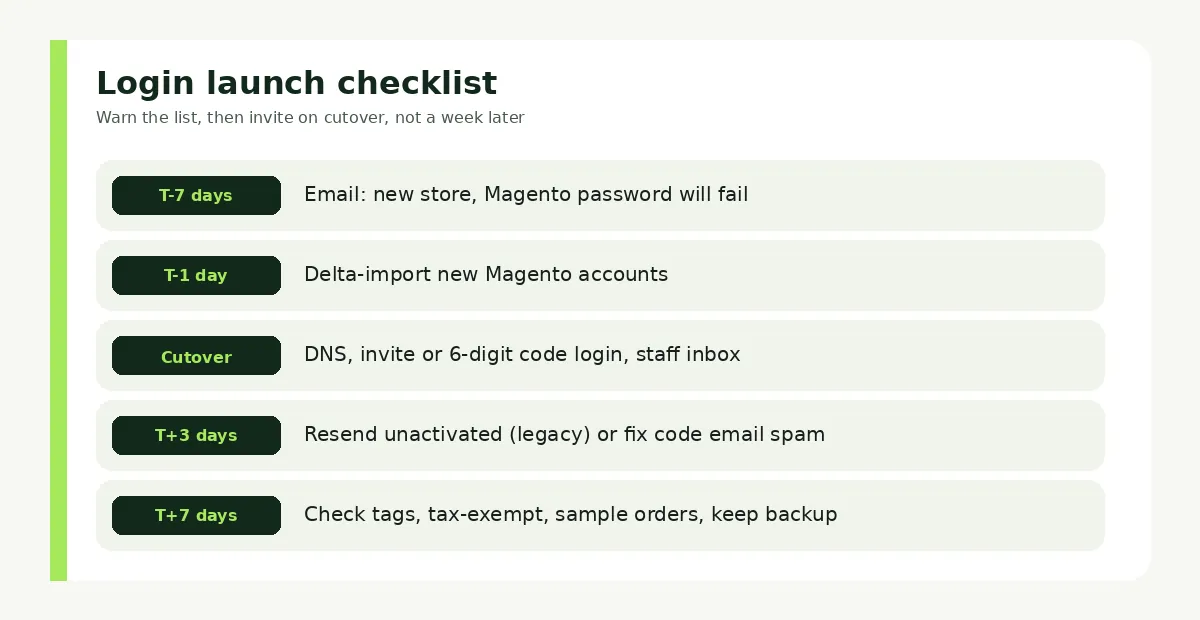
Launch-day runbook:
- T-7 days: Email the list. New store, same brand, you will set a new password or use an email login code. Do not bury that in a "new look" newsletter.
- T-1 day: Import any Magento customers created since the bulk export. Freeze Magento registrations if you can.
- Cutover: Point DNS. Send the invite, or publish a login-page banner that Magento passwords do not work. Staff the inbox for 72 hours. Write a macro before the fifteenth ticket, not after.
- T+3 days: Resend to anyone still unactivated on legacy accounts. On new customer accounts, the next visit is the login. They do not need a second invite unless the code email is landing in spam. Authenticate your sending domain.
- T+7 days: Spot-check wholesale tags, tax-exempt flags, and a handful of imported orders against Magento. Then keep the Magento database backup. You will need an old customer id.
The Magento customer move is done when a returning buyer can open the old login URL, reach Shopify, sign in, see their address, and find the orders you chose to keep. The CSV upload is the midpoint, not the finish.
Related Articles

Magento to Shopify Migration in 2026: Checklist, Data Map and Redirects
Magento to Shopify migration in 2026: Adobe support deadlines, what moves and what stays, which tool fits, a 301 redirect map, and a phased checklist.
Shopify Store Migration App: What It Does Not Move in 2026
The Shopify Store Migration app imports products and customers only. See what it does not move in 2026, plus how to run the official importer correctly.

Shopify Migration Checklist: Everything to Move Before You Switch Platforms
Use this complete Shopify migration checklist to move products, customers, orders, SEO data, and apps without losing sales when you switch platforms today.
How to Import Magento Reviews to Shopify (3 Methods)
Leave Magento reviews behind and conversion drops. Export a CSV, map those columns, and import Magento reviews to Shopify using three working methods.

How to Migrate to Shopify: The Complete Step-by-Step Guide for Online Stores
Planning to migrate to Shopify? Avoid data loss, broken SEO rankings, and costly downtime with this complete step-by-step migration guide for merchants.

Best Shopify Store Migration App in 2026: 5 Options Compared
Pick the right Shopify store migration app in 2026. Shopify's free Store Migration app vs LitExtension, Cart2Cart, Matrixify, and Migratify, by what moves.