
MigrationPro Alternative for Shopify: Move Your Store Data (2026)
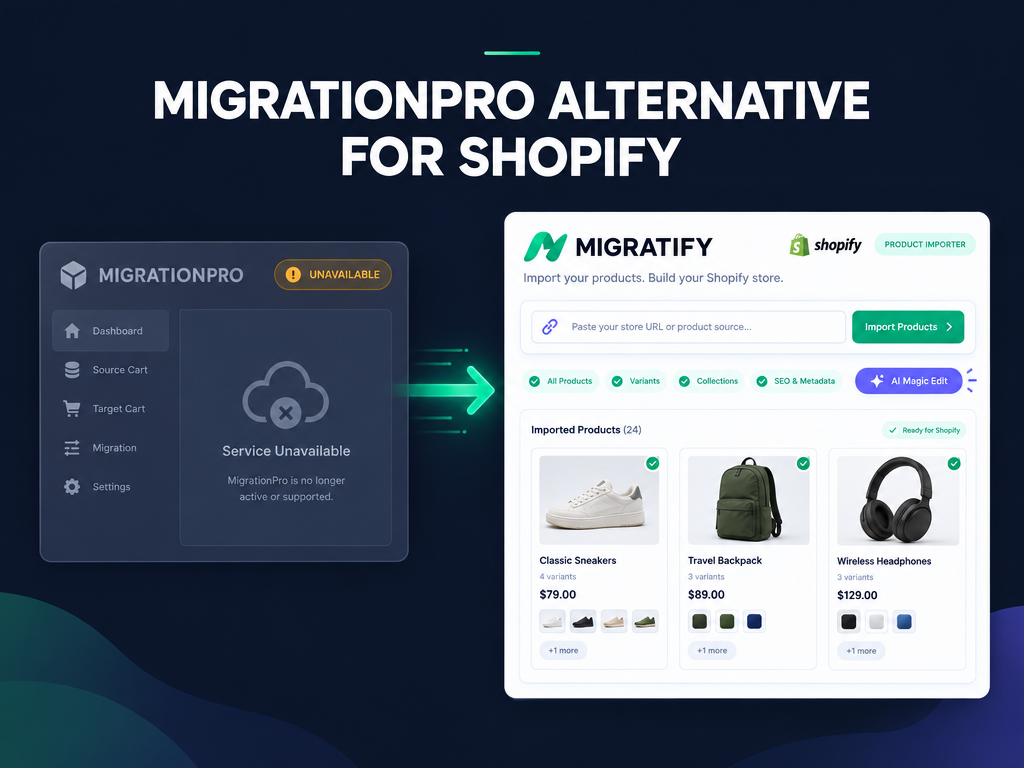
Searching for a trustworthy MigrationPro alternative became a priority for merchants and agencies replatforming to Shopify after MigrationPro: Store Migration (186 reviews) was delisted from the Shopify App Store on October 15, 2026. Several smaller catalog-copy utilities, including Copy products and Import - EA (delisted October 20) and Agora Amazon Listing Importer (delisted October 15), disappeared in the same week. Whether you are moving a product catalog from WooCommerce, Etsy, Amazon, BigCommerce, or another Shopify store, or transferring years of historical orders and customers, this guide breaks down the exact replacements that are live and supported today, starting with Migratify: Copy Products + AI for fast URL-based product migration.
What happened to MigrationPro on the Shopify App Store in October 2026?
On October 15, 2026, MigrationPro: Store Migration (developed by Migrationpro, LLC, with 186 reviews at removal) was delisted from the Shopify App Store. Visiting the listing URL now returns Shopify's unavailable app page, blocking new installations for merchants in the middle of a store launch or platform switch.
According to Revenue Shield's log of the 478 Shopify apps removed between October 14 and October 22, 2026, no public reason was given for MigrationPro's removal, and it was not among the three apps confirmed in the October checkout-redirect exploit. Alongside MigrationPro, smaller catalog importers such as Agora Amazon Listing Importer (7 reviews, delisted October 15) and Copy products and Import - EA (12 reviews, delisted October 20) were also removed during the same sweep.
Replatforming on a deadline leaves zero room for broken connectors. If a migration app loses App Store support mid-transfer, you risk half-imported variant trees, missing gallery images, or stalled background queues. Before you pick a replacement, decide whether your migration job only requires moving your product catalog cleanly or also requires migrating historical orders, customers, and URL redirects, as outlined in our step-by-step guide to migrating an online store to Shopify.
Do you need a product catalog importer or a full-history store migration tool?
Choosing the right MigrationPro alternative depends on one honest distinction: product catalog importers copy products, variants, images, and prices by URL without needing source API keys, while full-entity migration tools transfer historical orders, customer accounts, and 301 redirects via API or Excel spreadsheets. Paying hundreds of dollars for a per-entity migration wizard when you only want to move 300 products into a fresh Shopify store wastes both time and budget.
We detail what automated carts leave behind in our breakdown of what a Shopify store migration app does not move in 2026. Compare the two migration paths below to see which stack fits your project:
- Path A: Fast URL and Chrome extension product catalog migration (Migratify): If your priority is copying products (titles, descriptions, full-size gallery images, variant options, prices, compare-at prices, SKUs, barcodes, weights, vendors, product types, and up to 30 tags) from another Shopify store, WooCommerce, Amazon, Etsy, eBay, BigCommerce, Lazada, Daraz, Shopee, AliExpress, Temu, or Shein without wrestling with source API credentials or CSV formatting, Migratify handles the entire catalog transfer for a flat $14/month.
- Path B: Full historical orders, customers, and B2B data migration (Matrixify, LitExtension, Cart2Cart, or native Shopify CSVs): As documented in the Migratify data scope documentation, Migratify imports products only and does not migrate customers, orders, product reviews, gift cards, or store settings. If you must bring years of past orders and customer profiles from Magento, WooCommerce, or BigCommerce, pair Migratify (or use Matrixify or LitExtension) with Shopify's native Customer CSV importer and Wise Reviews for review CSV migration.
Hot take: Most merchants moving from Etsy, Amazon, or an older WooCommerce catalog pay $150 to $500+ in per-entity migration fees just to move products they could have imported by URL for $14/month, while their customer list could have been uploaded for free via Shopify's native Customer CSV template in ten minutes.
Which MigrationPro alternative fits your Shopify migration best in 2026?
The best replacement depends on whether you want a flat-rate URL product importer with built-in AI catalog editing, a spreadsheet powerhouse for 20 GB Excel files, or a pay-per-entity cart connector. We checked each app's live Shopify App Store listing, Built for Shopify status, rating, review count, and published pricing on October 27, 2026. For our wider hands-on testing, read our comparison of the best Shopify store migration apps in 2026.
1. Migratify: Copy Products + AI: Best for fast URL and Chrome extension product imports from 100+ platforms at $14/mo
Migratify: Copy Products + AI carries Shopify's Built for Shopify badge and holds a 4.5-star rating across 56 reviews on the Shopify App Store when we checked on October 27, 2026. It is built for merchants who want to copy individual products, collections, or entire Shopify catalogs (up to 10,000 products per import) without generating API keys on the source store.
According to the Migratify plans and pricing documentation and imported product data guide, here is how Migratify works:
- What product data Migratify imports: Title, description, full-size gallery images (automatically matching variant images and picking the highest-resolution copy on sites like PrestaShop and Vevor), variants and options (such as size and color), price and compare-at price, weight and weight unit, SKU and barcode, up to 30 tags per product, vendor, and product type.
- Two import methods (Direct URL + Chrome extension): Paste product URLs directly from Amazon, Etsy, eBay, WooCommerce, BigCommerce, Lazada, Daraz, or any public website (or paste a full Shopify collection or store homepage URL to import up to 10,000 products in one background job). For CAPTCHA-protected or login-protected sites like Shopee, AliExpress, Temu, Shein, and FashionGo, use the free Migratify Chrome extension with your Extension app key.
- Import settings and AI Magic Edit: Before starting an import, set a Price multiplier (such as 1.5x), assign products to an existing manual collection, toggle Set product as active (or import as Drafts for safe review), and configure shipping, tax, and inventory tracking. You can also run Magic Edit AI prompts to rewrite titles, translate descriptions, or generate SEO tags during import.
- Flat pricing tiers: The Free plan ($0) includes up to 5 total product imports and 5 monthly Magic Edit credits (requires an active paid Shopify store plan). The Standard plan ($14/month) includes unlimited product migrations, priority chat and email support, and 25 Magic Edit credits per month. The Plus plan ($29/month) includes unlimited product migrations and 5,000 Magic Edit credits per month (with optional AI credit top-ups at $1 per 100 credits on paid plans).
Trade-offs to know: Migratify imports products only; it does not import customers, historical orders, product reviews, videos, or automated collection rules, and products imported from Amazon or Etsy carry a cap of 100 variants per product.
2. Matrixify: Data Export Import: Best for spreadsheet-driven migrations of products, orders, customers, and redirects
Matrixify: Data Export Import is Built for Shopify certified and holds a 4.9-star rating across 1,826 reviews on the Shopify App Store as of October 27, 2026. Its Free Demo plan handles up to 10 products, 10 customers, and 10 orders per file, while paid plans cost $20/month (Basic: up to 5,000 products, 2,000 customers, 1,000 orders, and 10,000 redirects per file), $50/month (Big: up to 50,000 products, 20,000 customers, and 10,000 orders), and $200/month (Enterprise: unlimited) with support for Excel, CSV, and Google Sheets files up to 20 GB.
Trade-offs to know: Matrixify requires exporting data from your old platform (such as WooCommerce, Magento, or BigCommerce) into CSV or Excel files first, rather than pasting a live public storefront URL.
3. LitExtension Store Migration: Best for automated cart-to-cart API transfers with 301 redirects
LitExtension Store Migration carries the Built for Shopify badge and holds a 4.8-star rating across 325 reviews on the Shopify App Store as of October 27, 2026. It is free to install with a 20-entity demo (20 products, 20 orders, 20 customers) and charges usage-based fees scaled by the number of products, customers, and orders migrated across 140+ platforms.
Trade-offs to know: Unlike Migratify's flat $14/month unlimited product plan or Matrixify's $20/month tier, LitExtension bills per migration based on catalog and order count, and requires source store API credentials or database exports.
4. Cart2Cart Store Migration: Best for wizard-based self-service cart transfers
Cart2Cart Store Migration holds a 4.3-star rating across 174 reviews on the Shopify App Store as of October 27, 2026. Like LitExtension, it is free to install for a test demo and charges variable fees based on the number of products, customers, and orders moved from 80+ platforms.
Trade-offs to know: Cart2Cart does not carry the Built for Shopify badge, and optional extras such as 301 URL redirects or preserving order IDs can raise the final migration invoice significantly. If you are deciding between a self-serve tool and a turnkey agency, read our guide on how to choose a Shopify migration service and avoid costly mistakes.
How do you choose between URL importing, Excel spreadsheets, and API cart connectors?
Selecting the right migration method comes down to where your source catalog lives, whether you have back-end admin access to the old store, and how much data cleanup your product listings need before going live on Shopify. Many store owners start a migration assuming they need an expensive database connector when their real bottleneck is cleaning up messy product titles, low-resolution thumbnails, and inconsistent variant options.
Use this three-part decision rule before starting your transfer:
- Choose URL and Chrome extension importing (Migratify) when: You want to import products from a live storefront URL (such as WooCommerce, Etsy, Amazon, eBay, BigCommerce, Shopee, AliExpress, or another Shopify store) without exporting CSV files or generating API tokens, or when you want AI Magic Edit to rewrite titles, descriptions, and tags as products land in your Shopify drafts.
- Choose Excel or CSV spreadsheet importing (Matrixify or native Shopify CSVs) when: You are comfortable working in Google Sheets or Excel, need to migrate thousands of historical orders, customer profiles, B2B company records, custom metafields, or 301 redirects in bulk, and already have a clean data export from your legacy platform.
- Choose an automated cart-to-cart API wizard (LitExtension or Cart2Cart) when: You have full admin API credentials on a legacy cart like Magento, PrestaShop, or Shift4Shop, want a single wizard to move products, customers, and orders together without editing spreadsheets, and are comfortable paying variable per-entity fees based on store size.
How do you migrate your catalog and store data to Shopify step by step?
The fastest way to replace MigrationPro without overspending is to combine Migratify for your product catalog with native Shopify or spreadsheet tools for your customer list, order archive, and URL redirects. If you are cloning or consolidating an existing Shopify store, see our dedicated guide on how to migrate products from one Shopify store to another.
Follow this five-step workflow to complete your store migration cleanly:
- Import your product catalog as Drafts in Migratify: Install Migratify, open the Import page, and paste your source product URLs (or a full Shopify store or collection URL for up to 10,000 products). For Shopee, AliExpress, Temu, or Shein, open the product page in Chrome and use the Migratify Chrome extension. In Import settings, turn Set product as active off so products import as Drafts, pick a manual destination collection, optionally apply a Magic Edit prompt, and click Start migration. Because imports run on Migratify's servers, you can close your browser tab while large catalogs finish.
- Spot-check variants, images, and SKUs in Shopify Admin: Once the import finishes, open a sample of Draft products in your Shopify admin to confirm variant options, full-size gallery images, prices, compare-at prices, SKUs, and barcodes landed accurately before setting the products to Active.
- Move customers and historical orders (if replatforming an established store): If you are moving from WooCommerce, Magento, or BigCommerce and need customer profiles, export your customer list to Shopify's free native Customer CSV format (under Customers and Import in Shopify admin), or run a one-month $20 Matrixify job if you also need historical orders imported into Shopify Orders.
- Migrate your product reviews separately: Cart migrators rarely move photo and video reviews cleanly. Export your reviews from your old platform or marketplace and import them via Wise Reviews so your star ratings and customer photos stay intact on your new product handles.
- Set up 301 URL redirects before switching your domain: Map your old product and collection URLs to your new Shopify product and collection paths so search engines and bookmarked links never hit a 404 page after launch.

Migratify: Copy Products + AI
SponsoredProduct import made easier! Effortlessly migrate products from 100+ platforms.
Related Articles

Best Shopify Store Migration App in 2026: 5 Options Compared
Pick the right Shopify store migration app in 2026. Shopify's free Store Migration app vs LitExtension, Cart2Cart, Matrixify, and Migratify, by what moves.

How to Migrate to Shopify: The Complete Step-by-Step Guide for Online Stores
Planning to migrate to Shopify? Avoid data loss, broken SEO rankings, and costly downtime with this complete step-by-step migration guide for merchants.

Shopify Migration Service: How to Choose the Right One (And Avoid Costly Mistakes)
A Shopify migration service can save your store or sink it. Learn about real costs, SEO risks, hidden fees, and exactly how to pick the right partner.

How to Migrate Products from One Shopify Store to Another in 2026 (3 Methods)
Migrate products from one Shopify store to another in 2026 with CSV, a URL importer, or a bulk spreadsheet. Keep images intact and see what will not move.
Shopify Store Migration App: What It Does Not Move in 2026
The Shopify Store Migration app imports products and customers only. See what it does not move in 2026, plus how to run the official importer correctly.

Shopify Migration Checklist: Everything to Move Before You Switch Platforms
Use this complete Shopify migration checklist to move products, customers, orders, SEO data, and apps without losing sales when you switch platforms today.