
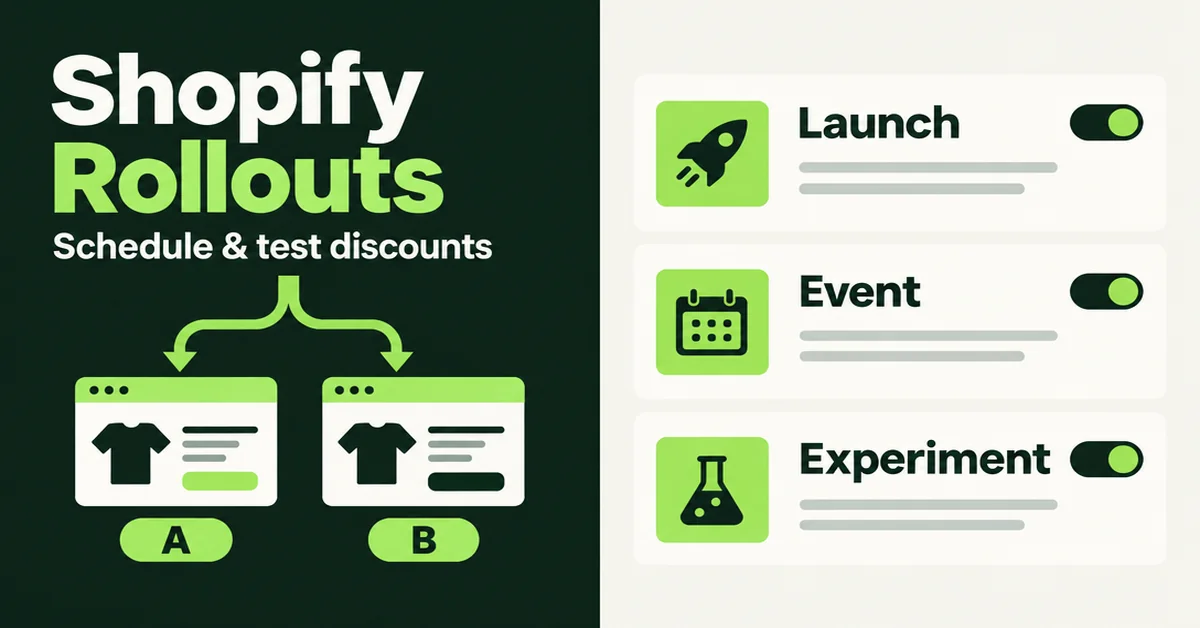
You can schedule and test Shopify discounts with Rollouts from Markets in your admin: launch an offer to part of your traffic, run it for a fixed window, or A/B test it against your current discount setup before you go wide. Shopify added discount changes to Rollouts on 2 October 2026, so promotions can ship with theme or checkout updates in one controlled release instead of three separate clocks.
This guide is for merchants who already create discounts and want a safer way to turn them on. It is not a second compare-at pricing tutorial, and it is not a bulk price CSV walkthrough. Those jobs live on our compare-at pricing guide and bulk price scheduling guide.
What are Shopify Rollouts, and what changed for discounts in 2026?
A rollout is a scheduled set of store changes you control from Markets, covering your main theme, checkout and accounts, catalogs, discounts, or a mix. As of early October 2026, you can activate or deactivate existing discounts inside that same rollout.
According to Shopify's 2 October 2026 changelog, discount Rollouts let you:
- Schedule a discount change for a slice of online store traffic, then expand it.
- Compare a discount change against your store's existing offers.
- Launch a discount together with theme and checkout changes in one rollout.
Shopify's Rollouts help overview puts the feature under Markets > Rollouts. You are not inventing a new coupon type. You point a rollout at discounts you already built, then choose whether that rollout activates or deactivates them for the visitors it covers.
Your discount's own eligibility rules still apply. Customer segments, purchase requirements, and product exclusions do not disappear because a rollout turned the discount on.
What is the difference between a Launch, an Event, and an Experiment?
A Launch makes changes permanent for the traffic you allocate. An Event runs for a set window and rolls back. An Experiment splits eligible visitors between a control and a treatment so you can compare results.
Shopify documents three types in Types of rollouts and changes:
- Launch: no control/treatment split at the change level. Eligible visitors get the change, and it merges into the store permanently.
- Event: same audience idea as a Launch, but it needs an end date. When the Event ends, Shopify rolls the changes back unless you apply them permanently.
- Experiment: compares treatment against control. Defaults are a 50/50 traffic split and an end date 90 days out. You can change both before you save.
Plan note from Shopify: Experiments need the Grow plan or higher. Basic merchants can still use Rollouts for Launch and Event style scheduling; they cannot run the control-versus-treatment Experiment path. Confirm what your admin shows before you promise an A/B test in a campaign brief.
For discount Experiments, the control is your store's normal discount behavior for the discounts you selected. You do not pick a random second coupon as the control. The treatment activates or deactivates those discounts for the treatment audience.
How do you schedule and test Shopify discounts with Rollouts step by step?
Build the discount first, then create a rollout that activates or deactivates it, then set audience, dates, and end behavior before you save. Do not invent the offer inside the rollout screen.
- Create or finish the discount in Discounts. Set eligibility, minimums, combinations, and the discount's own start and end dates. Those dates keep working even when a rollout also controls the discount.
- Open Markets > Rollouts > Create rollout. Name it after the decision, for example "BFCM free-ship threshold experiment".
- Pick the type. Use Event for a timed sale that should roll back. Use Experiment (Grow+) when you need a control group. Use Launch when you are ready to keep the change.
- Add a Discounts change. Choose Add changes, select Discounts, pick the discount(s), and set activate or deactivate.
- Set audience and traffic allocation. Decide which share of eligible visitors the rollout covers. For an Experiment, also set the control/treatment split.
- Set schedule and timezone. Start and end times follow your store timezone in Settings > General. Read both the rollout schedule and the discount's own dates so they do not fight each other.
- Review conflicts, then save. Shopify surfaces conflicting settings in setup. Fix those before you rely on the test.
Shopify's changelog also notes you can keep using ordinary discount start and end dates for standalone promotions. Rollouts are for coordinated launches and measured tests, not a replacement for every simple weekend code.
What should you check before you send traffic to a discount Rollout?
Verify the control and treatment experiences on real baskets, confirm codes cannot leak the test, and write down the margin guardrail before ads go live. A clean admin setup is not the same as a clean customer journey.
- Qualifying basket: Does the treatment discount apply when it should?
- Near-miss basket: Does a cart just under the threshold correctly fail?
- Excluded products: Do sale or wholesale SKUs stay out?
- Stacking: If another automatic discount is live, does the treatment create a bigger deal than you intended?
- Shareable codes: Shopify's analytics docs warn that a code activated inside an Experiment can still be shared outside the test group. Prefer automatic discounts for cleaner Experiments when you can.
- Channel: Rollout analytics measure online store, cart, and checkout visitors. Headless and POS traffic are not in those results.
- App compatibility: Discount, loyalty, and reporting apps may not understand Rollouts yet. Ask vendors whether they read rollout serving state, not only the discount's static status.
If you are also changing compare-at prices for agentic channels or the storefront, keep that job separate unless the experiment is deliberately about the full package. Shopify now shares compare-at prices to AI shopping agents through Catalog when you allow it, per the 9 October 2026 changelog. That is display data for agents, not a Rollouts discount test.
Which metrics do Rollouts show for discount tests, and what is missing?
Rollouts report the same general store metrics they report for other change types. They do not report discount-attributed revenue or discount-attributed orders.
Shopify's Rollout analytics help is blunt on this point: a rollout that contains a discount change reports the same metrics as any other rollout, and discount-specific attributed revenue or orders are not available. You also cannot customize which metrics appear.
For Experiments with theme changes, common metrics include conversion rate, bounce rate, add-to-cart rate, and reached-checkout rate. Checkout Experiments focus on checkout conversion. Treat those as behavior signals, not as profit.
Two more analytics caveats from Shopify:
- For discount rollouts, exposures match assignments in ways that can count visitors who reach a stage where a discount could apply, even when eligibility is messy.
- If you activate a shareable discount code inside an Experiment, people outside the treatment group can still redeem it after someone shares the code.
So build a second layer of evidence outside the Rollouts card: paid and fulfilled orders, discount cost, refunds, and contribution after variable costs. Our guide on running a Shopify sale without destroying margins is the decision frame Rollouts will not compute for you.
Hot take: A higher conversion rate on a discount Experiment is not a win if contribution per visitor falls. Shopify will not print that contribution number on the Rollouts analytics page. You still have to do the margin math.
When should you use Rollouts instead of discount dates or a bulk price edit?
Use Rollouts when you need traffic allocation, a timed rollback, a control group, or a coordinated theme-plus-offer launch. Use ordinary discount dates for a simple storewide code. Use a bulk editor when the sale is a catalog price rewrite, not a discount object.
- Ordinary discount dates: one offer, full store (or one segment), no need to A/B. Fastest path.
- Rollouts Event: temporary campaign that should auto-roll back, optionally bundled with a theme banner.
- Rollouts Experiment (Grow+): you have enough traffic to learn, and you will judge the result with margin math.
- Bulk price edit: you are changing variant prices or compare-at fields across hundreds of SKUs. That is catalog work. See our bulk product editor comparison. If a catalog price edit goes wrong, use your editor's task history before you try a CSV overwrite.
Pricing strategy still sits above the tooling. If the offer is wrong for the brand, Rollouts only helps you lose money with better instrumentation. Start from Shopify pricing strategies for maximum profit when the question is what to charge, not how to schedule the test.
How should a small store run its first discount Experiment without wrecking margins?
Start with one automatic discount, a short Event or Experiment window, a written contribution guardrail, and a human who can pause the rollout. Skip Experiments entirely if weekly sessions cannot support a clean comparison.
- Pick one hypothesis. Example: "A free-shipping threshold at cart reduces checkout drop-off enough to cover the shipping subsidy."
- Prefer automatic discounts over shareable codes for Experiments so the offer cannot travel by SMS outside the test group.
- Keep everything else steady. If you change the theme, offer, and checkout together, you are testing a package, not the discount alone.
- Write the kill switch. Who pauses the rollout if payment failures spike or contribution falls below X?
- Review native metrics plus your own order export on a fixed date. Do not stop early because one afternoon looked good.
- Decide keep, extend, or stop with the end-state choice Shopify offers when a rollout ends: roll back, or apply permanently. Permanent apply cannot be undone through that ended rollout.
Low-traffic stores often get more from fixing product-page friction and running a carefully bounded Event than from claiming precision on a 40-session Experiment. The feature is powerful. It is not a substitute for volume.
How do discount dates and Rollout schedules interact?
A discount is active for a customer when the discount's own active dates apply, or when an active rollout that activates that discount applies to that customer. A rollout that deactivates a discount can keep it off for people in the rollout even while the discount's own dates say it should be live.
That dual clock is the detail most setup posts skip. Shopify's rollout-types help spells it out for discount changes: the discount keeps its own dates, and those dates continue independently of the rollout. Practical implications:
- If the discount expires on Friday but the Event runs through Sunday, treatment visitors may lose the offer early.
- If the discount is scheduled to start Monday but you activate it in a rollout on Sunday, eligible rollout visitors can see it before the standalone schedule.
- If you deactivate a discount in a rollout while its dates are still open, treatment visitors will not get it even though the Discounts page still looks "on" for everyone else.
Write both clocks into the campaign brief. Store timezone lives in Settings > General. If your ads team works in another zone, put both labels on the brief so nobody "fixes" the wrong clock at 11:55 p.m.
What are the plan and permission limits you should know in 2026?
Experiments require Grow or higher. Staff need the right Rollouts and Discounts permissions. Always confirm in your own admin, because feature flags and plan names can differ by shop.
Public Shopify pricing in 2026 lists Basic, Grow, and Advanced as the core online plans (commonly cited US monthly prices are $39 / $105 / $399 billed monthly, or $29 / $79 / $299 billed yearly on shopify.com/pricing). Recheck the live page before you budget. The hard product rule from Shopify's Rollouts docs is the Experiment gate on Grow+, not the sticker price.
If your store is on Basic, you can still schedule Launch and Event rollouts for discounts and coordinated campaigns. Move to Grow when you need a true control group and experiment analytics pipeline.
Rollouts will not replace judgment. They give you a controlled switch for offers you already designed. Use them when traffic allocation, rollback, or a real control group matters. Keep ordinary discount dates for simple codes, and keep bulk editors for catalog price work. Then judge the result on contribution, not on a single conversion spike.
Related Articles
How to Run a Shopify Sale Without Destroying Your Margins
Learn how to run a Shopify sale that drives revenue without crushing profit margins. Strategy, math, and tools every store owner needs before discounting.
Compare-at Pricing on Shopify: How to Show Discounts That Actually Convert
Learn how compare-at pricing on Shopify works, how to set it up correctly, and the strategies that turn strikethrough pricing into real conversions.
How to Schedule Bulk Price Changes on Shopify (3 Methods That Actually Work)
Three methods to schedule bulk price changes on Shopify: native bulk editor, CSV import, and dedicated apps. Stop updating prices one by one at midnight.

Shopify Pricing Strategies: How to Price Products for Maximum Profit
Stop leaving money on the table. Learn Shopify pricing strategies that actually work, with real cost formulas, psychology tactics, and testing methods.
Best Shopify Bulk Product Editor Apps Compared (2026)
Compare Shopify bulk product editor apps by undo depth, backup windows, 2026 pricing, scheduling, and catalog size so you pick a safe fit for your store.
Shopify Bulk Product Editing: The Complete Guide to Updating Your Catalog Fast
Master Shopify bulk product editing with the native editor, CSV imports, and third-party apps. Update prices, tags, and descriptions across your catalog fast.