
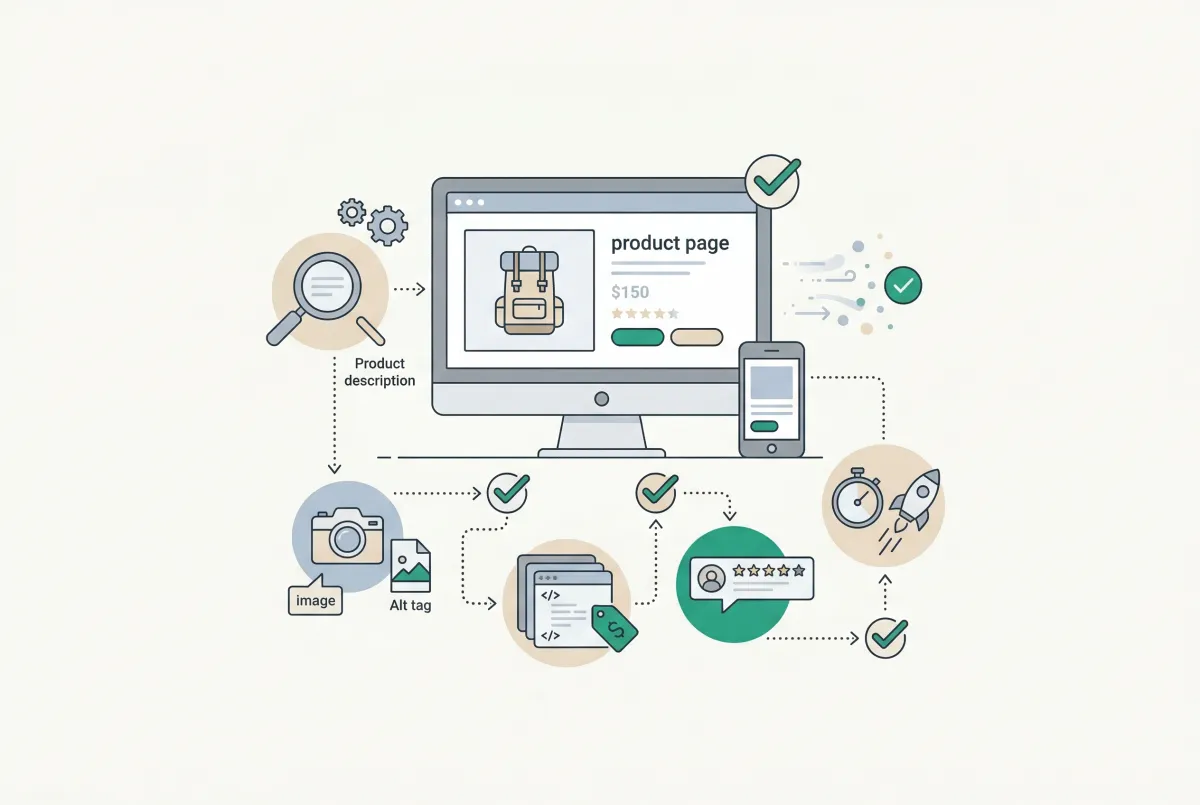
Organic search drives 43% of all ecommerce traffic, making it the single biggest source of visitors for online stores. Yet most Shopify merchants treat Shopify product page SEO as an afterthought, filling in a few fields and hoping Google figures out the rest. That approach leaves money on the table. This checklist walks you through every optimization your product pages need in 2026, with specific steps you can follow inside Shopify's admin right now.
Nearly one in four ecommerce orders (23.6%) traces directly back to organic search, according to data compiled by Charle Agency. If your product pages aren't pulling their weight in search results, you're losing real revenue, not just impressions.
What Does a Fully Optimized Shopify Product Page Actually Look Like?
A fully optimized product page checks every box: keyword-targeted title tag, compelling meta description, unique product copy, compressed images with descriptive alt text, structured data markup, and internal links connecting it to the rest of your store. Most pages are missing at least three of these.
Here's the quick-reference checklist. Each item links to a deeper section below.
- Title tag with primary keyword, 50 to 60 characters
- Meta description between 150 and 160 characters, written for clicks
- URL handle that's short, descriptive, and lowercase
- Unique product description of 300+ words (never copy-paste from manufacturers)
- Image alt text on every product photo
- Compressed images under 200KB each
- Schema markup for product, price, availability, and reviews
- Canonical tags properly set (especially for variants)
- At least 2 to 3 internal links pointing to and from the product page
- Customer reviews visible on the page and marked up with review schema
Print that list. Tape it to your monitor. Run your top 10 product pages through it this week, and you'll be ahead of 80% of Shopify stores.
How Do You Research and Choose the Right Keywords for a Product Page?
Start with long-tail keywords that match buyer intent, not broad category terms. Long-tail keywords convert at 2.5x the rate of broader head terms because they align with shoppers who already know what they want, according to Charle Agency's ecommerce SEO data.
Broad terms like "running shoes" attract browsers. A phrase like "women's trail running shoes wide toe box" attracts buyers. Your product pages should target the second type.
A Simple Keyword Research Workflow
- Type your product into Google and look at the autocomplete suggestions. These reflect actual searches.
- Check the "People also ask" and "Related searches" sections at the bottom of results pages.
- Use a free tool like Google Keyword Planner or Ubersuggest to check monthly search volume. Aim for terms with 100 to 5,000 monthly searches and clear purchase intent.
- Look at competitor product pages that rank well. What phrases do they use in their title tags?
- Pick one primary keyword and two to three secondary keywords per product page. Don't stuff them all into one tag.
For dropshippers and wholesalers pulling product data from manufacturer feeds, this step matters even more. Your supplier's default product names are generic and shared across hundreds of competing stores. Rewrite accordingly.
How Should You Write Title Tags and Meta Descriptions That Rank and Get Clicked?
Your title tag is the single most important on-page SEO element for ranking, and the average ecommerce product page title is only 39 characters long. That's well below the recommended 50 to 60 characters, according to Reboot Online's primary research. The average meta description clocks in at just 96 characters, nearly 60 characters shorter than the 150 to 160 character sweet spot.
That's a massive missed opportunity. You're leaving ranking signals and click-through potential empty.
Title Tag Formula
Use this structure: [Primary Keyword] + [Key Differentiator] + [Brand]. For example: "Women's Waterproof Hiking Boots, Lightweight Gore-Tex | TrailCo." Keep it under 60 characters so Google doesn't truncate it. Note that Shopify appends your store name to every product title by default, so factor that into your character count.
Meta Description Formula
Lead with a benefit or solve a pain point in the first sentence. Include the primary keyword naturally. Add a subtle call to action. Example: "Lightweight hiking boots with Gore-Tex waterproofing and cushioned insoles. Built for all-day comfort on any trail. Free shipping over $75."
In Shopify, you'll find both fields in the "Search engine listing" section at the bottom of each product editing page. Click "Edit website SEO" to expand it, and you can customize the page title, meta description, and URL handle.
If you have dozens or hundreds of products that need updated title tags and descriptions, doing this one at a time is painful. Tools like Edify let you bulk-edit product fields across your catalog, which makes updating SEO metadata across hundreds of products practical instead of a weekend-long chore. You can also learn more about efficient catalog management in our guide to bulk editing products on Shopify.
Why Are Product Descriptions Still a Major SEO Lever, and How Do You Write Them?
Unique, detailed product descriptions give Google text to index and rank. Copy-pasting manufacturer descriptions means you're competing with every other store selling the same product using the exact same words. Google has no reason to rank your version.
Write at least 300 words of original copy per product. That sounds like a lot, but it breaks down easily: two to three sentences on what the product is, a short paragraph on who it's for, a bulleted feature list, and a brief section on materials or specs.
For Dropshippers and Wholesalers Using Manufacturer Feeds
If you import products in bulk from suppliers, you're probably starting with identical descriptions used by hundreds of other stores. Here's a realistic workflow for rewriting at scale:
- Prioritize your top 20 products by revenue. Rewrite those first.
- For each product, add context the manufacturer doesn't provide: who uses it, what problem it solves, how it compares to alternatives.
- Use secondary keywords naturally throughout. Don't repeat the same phrase five times.
- For the remaining long-tail products, at minimum rewrite the first two sentences and the bulleted feature list. Even partial uniqueness helps.
Batch this work. Set aside two hours a week to rewrite 10 descriptions. In two months you'll have covered your entire top-performing catalog.
How Do Images, Alt Text, and Page Speed Affect Your Shopify Product Page Rankings?
Page speed matters more than most merchants realize. Ecommerce sites that load in one second convert at 2.5x the rate of sites loading in five seconds, according to Portent's analysis of over 100 million page views. Images are almost always the biggest culprit slowing things down.
Every uncompressed hero image and oversized lifestyle photo drags your page speed down, which directly hurts your rankings and your conversion rate.
Image Optimization Checklist
- Compress before uploading. Use TinyPNG, ShortPixel, or Squoosh to get images under 200KB without visible quality loss.
- Use descriptive file names. Rename "IMG_4823.jpg" to "womens-waterproof-hiking-boot-grey.jpg" before uploading. Google reads file names.
- Write alt text for every image. Describe what's in the photo using natural language. Include the product name and one relevant keyword. Example: "Women's grey waterproof hiking boot with Gore-Tex lining, side view." Don't keyword-stuff.
- Use WebP format when possible. Shopify automatically serves WebP versions of uploaded images to supported browsers, but starting with optimized source files still matters.
- Limit product images to 5 to 8 per page. More isn't always better if it tanks your load time.
Run your product pages through Google PageSpeed Insights (pagespeed.web.dev) and fix whatever it flags. Focus on Largest Contentful Paint (LCP) first, as that's the metric Google weighs most heavily for ranking.
What Technical SEO Elements (Schema, Canonical Tags, Internal Links) Do Shopify Merchants Most Often Get Wrong?
Schema markup, canonical tags, and internal links are three of the highest-impact technical SEO elements, and most Shopify stores get at least one of them wrong. Pages with structured data achieve 20 to 40% higher click-through rates than standard listings, with some studies reporting improvements as high as 82%, based on research compiled by Charle Agency.
Meanwhile, 86% of ecommerce brands lack properly optimized internal links, including 41% of the highest-visibility stores, per Reboot Online's research. Internal linking is the most underused SEO lever on product pages.
Schema Markup
Shopify themes include basic product schema by default, but most themes only output the product name and price. You want rich schema that includes price, availability, review count, average rating, brand, and SKU. Check your current markup by pasting a product URL into Google's Rich Results Test tool (search.google.com/test/rich-results).
If it only shows "Product" without review stars or pricing, your schema needs work.
You can also connect your product feed to Google Merchant Center's free listing program, which surfaces your products in Google Shopping, Google Images, and the "Popular Products" carousel without any ad spend. The eligibility requirements are straightforward for most Shopify stores using the Google and YouTube channel app.
Canonical Tags and Product Variants
Shopify generates variant URLs like "?variant=12345678" by default. Shopify's built-in canonical tag points all variant URLs back to the main product URL, which is correct behavior in most cases. It prevents Google from indexing dozens of near-duplicate pages for color and size variations.
However, there are situations where you should split variants into separate product pages: when a variant targets a completely different keyword (for example, "blue suede sneakers" versus "red leather sneakers"), when variants have significantly different descriptions, or when search volume justifies a standalone page. If you're working with custom product options and variants, think carefully about whether consolidation or separation serves your SEO goals better.
Internal Linking
This is the one that almost everyone ignores. Your product descriptions should link to related products, relevant collection pages, and blog posts that support the purchase decision. Your blog posts should link back to product pages. This creates a web of relevance signals that Google follows.
Here's my hot take: most Shopify merchants are wasting time A/B testing button colors while their product pages have meta descriptions that are 80 characters long, zero internal links, and image file names like "IMG_4823.jpg." The basics are still broken on the majority of stores, and that's actually great news. Fixing fundamentals in 2026 still moves the needle faster than any advanced tactic. Stop chasing algorithm updates and spend two hours running your top 10 product pages through this checklist.
How Do User-Generated Content and Reviews Factor Into Shopify Product Page SEO?
Customer reviews add unique, keyword-rich content to your product pages that you didn't have to write. Every review is fresh text that Google can index, and reviews naturally contain the long-tail phrases real buyers use. They also build trust signals that improve click-through rates when review schema shows star ratings in search results.
If you don't have a review strategy, start collecting reviews immediately. Even five reviews per product makes a measurable difference in both conversions and search visibility. Our guide on how product reviews increase Shopify conversion rates covers the full playbook for collecting and displaying reviews effectively.
Making Reviews Work for SEO
- Display reviews directly on the product page, not behind a tab or accordion. Google needs to see the text on page load.
- Use a review app that outputs proper review schema (AggregateRating and Review structured data). Test with Google's Rich Results Test to confirm.
- Respond to reviews. Your responses add even more indexable content to the page and show Google the page is active.
- Import reviews from other platforms if you're migrating stores or selling on multiple channels. Tools like WiseReviews can pull in photo and video reviews from other ecommerce platforms, giving new product pages immediate social proof and indexable content.
- Don't fake reviews. Google's algorithms are increasingly good at detecting patterns in fake review content, and the penalties aren't worth the short-term boost.
How Do You Know If Your Shopify Product Page SEO Is Actually Working?
Track three metrics in Google Search Console: impressions, clicks, and average position for your product page URLs. If impressions are rising but clicks aren't, your title tags and meta descriptions need work. If clicks are rising but conversions aren't, the problem is on-page experience, not SEO.
Give changes at least four to six weeks before judging results. Google doesn't re-crawl and re-rank pages overnight.
Your Monthly SEO Check-In
- Google Search Console > Performance > Pages. Filter by your product URLs. Sort by impressions to find pages Google is starting to notice.
- Check click-through rates. Product pages with a CTR below 2% probably have weak title tags or meta descriptions. Rewrite them.
- Look for cannibalization. If two product pages rank for the same keyword, consolidate or differentiate them.
- Review Core Web Vitals. Go to the Experience section in Search Console. Fix any pages flagged as "Poor" for LCP or CLS.
- Monitor indexed pages. Run a "site:yourstore.com/products/" search in Google. If pages aren't showing up, check for noindex tags or crawl errors.
Product page SEO isn't a one-time project. It's an ongoing cycle: optimize, measure, refine.
The stores that win organic traffic in 2026 aren't the ones using the fanciest tools or chasing every algorithm update. They're the ones who consistently nail the fundamentals on every single product page. Start with your top 10, work through this checklist, and build from there.
Related Articles

Learn to write Shopify product descriptions that rank on Google and convert shoppers into buyers. Includes SEO tips, copywriting frameworks, and examples.
Most Shopify merchants overlook Shopify collection page SEO. This guide shows you how to optimize category pages and capture high-intent search traffic.
Learn how to find and fix the most common Shopify duplicate content problems, from collection URLs to tag pages, variants, and pagination. Rank higher.
How Product Reviews Boost Your Shopify SEO Rankings (And Why Most Merchants Ignore It)
Product reviews do more than build trust. They actively improve Shopify SEO rankings. Learn how UGC, rich snippets, and keywords drive organic traffic.

How Product Reviews Increase Shopify Conversion Rates (And How to Get More of Them)
Product reviews can lift Shopify conversion rates by up to 380%. Learn how reviews, photos, and UGC turn browsers into buyers, with data to back it up.
Shopify Themes Comparison: Studio vs Impact vs Dawn vs Sense (Which One Fits Your Store?)
Shopify themes studio impact dawn sense comparison: real-world speed data, features, pricing, and which theme fits your store in 2026.