
How to Import Reviews from CJdropshipping to Shopify (3 Methods That Work)

If you source through CJdropshipping, your supplier pages already carry buyer ratings and photos while your Shopify product pages sit empty. You can still import reviews from CJdropshipping to Shopify. Unlike Temu or Shopee on many review apps, CJdropshipping is not a CAPTCHA-first source. The reliable paths are a product URL paste, CJ's own Buyer Reviews CSV export, or another importer that documents CJ support.
This page is CJdropshipping-only. Shop App sellers can use our Shop App review import walkthrough. For a wider marketplace map, see our roundup on importing reviews from Amazon, AliExpress, and more. The steps below follow the same one-job pattern as our Wish review import walkthrough and Lazada review import walkthrough, plus our HKTVMall review import walkthrough, with CJ-specific CSV export and URL quirks called out.
Why Should You Import CJdropshipping Reviews When Opening Shopify?
Imported CJ reviews give Shopify hero SKUs day-one social proof so shoppers do not bounce from blank ratings. Northwestern's Spiegel Research Center found that products with five reviews have a 270% greater purchase likelihood than products with none.
The same Spiegel work reported conversion lifts of about 190% for lower-priced products and 380% for higher-priced ones when reviews were displayed, with purchase likelihood peaking between 4.0 and 4.7 stars. Dropshipping catalogs often skew toward discovery and value SKUs, so empty Shopify pages still hurt when shoppers compare your store to the CJ or AliExpress listing they already trust.
Bazaarvoice also reports that 10 product reviews can lift conversion by 45%, and that 60% of shoppers would rather buy a product with 10 reviews that include user images than 200 text-only reviews. You do not need every CJ comment on day one. You need authentic ratings and photos on the SKUs shoppers hit first.
Most CJ sellers are not quitting the supplier overnight. They add Shopify for brand control, owned email lists, and checkout that is not locked inside a marketplace. That dual-channel move only works if Shopify looks credible next to the product page buyers already saw. Imported reviews also buy you time: organic Shopify review collection takes weeks, while a seeded product page lets paid traffic and email launches start sooner.
Can You Export Reviews from CJdropshipping?
Yes. On many CJdropshipping product pages you can open the Buyer Reviews tab and click Export reviews to download a CSV. Judge.me documents that flow in its CJdropshipping import help article, and CJ's own help content covers exporting reviews (up to 10,000 per product on their Air Product Reviews path) then filling in your Shopify product handle.
That export is a real advantage versus Wish, Temu, or Shopee, where sellers often have no clean review download. CJ still does not sync reviews into Shopify by itself. You still need a review app to map handles, display widgets, and moderate what goes live.
If Export reviews is missing on a product, the listing may not expose shareable buyer reviews, or you may be on a supplier view that hides the tab. Fall back to a product URL importer or a careful manual CSV you build yourself.
Hot take: Half the 2024 CJ guides still treat Judge.me CSV as the only path. In 2026, CJdropshipping is a URL-paste source on capable apps. Use the CSV when you want curation. Do not make every SKU a spreadsheet job.
Which Shopify Apps Support CJdropshipping Review Imports?
Fewer free apps support CJ than AliExpress. Before you install anything, open the Shopify App Store listing and confirm CJdropshipping is named under Works with or supported sources.
WiseReviews lists CJdropshipping among supported sources (AliExpress, Amazon, CJdropshipping, eBay, Etsy, HKTVMall, Lazada, Shein, Shop App, Shopee, Temu, Tokopedia, Wish). As of September 2026, Free is $0 for up to 100 published reviews held at a time, plus a lifetime 300 marketplace URL and Chrome extension import allowance (deletes do not refund that 300). Standard is $9.95/month for up to 50,000 reviews with auto-sync, and Plus is $19.95/month for unlimited reviews plus bulk multi-URL import. The listing sits at 4.8 stars from 166 reviews. For CJ, use the standard product URL import flow. Amazon, Shopee, Shein, and Temu need the Chrome extension. CJdropshipping does not.
Judge.me documents a free-plan CSV path: export from CJ Buyer Reviews, add Shopify product handles in a sheet, then import via Settings, Import reviews, using the Shopify Product Reviews (deprecated) CSV profile. Judge.me notes that CJ imports are not marked verified because CJ does not supply verification data that meets its standards.
Air Product Reviews (Avada) documents both a CJ CSV upload and a paste-URL import for AliExpress or CJdropshipping product review links. LAI Product Reviews markets a Chrome extension button on the CJ site for bulk pulls. Confirm plan limits and CJ coverage on the live listing before you pay.
When you compare listings, look for three CJ signals: the word CJdropshipping in Works with or features, whether URL paste works without a browser extension, and whether free tiers exclude CJ. Pricing should follow catalog size. Free's 100-held published cap and lifetime 300 marketplace/extension imports can prove the workflow. Past that, paid plans matter for auto-sync and higher caps.
How Do You Import Reviews from CJdropshipping to Shopify with a Product URL?
Paste the CJdropshipping product URL into a review app that supports CJ, map it to your Shopify product, set filters, and import. This is the primary method for most sellers, and the one you should try first when the product page is public and has reviews.
With WiseReviews, the flow follows the importing-reviews docs:
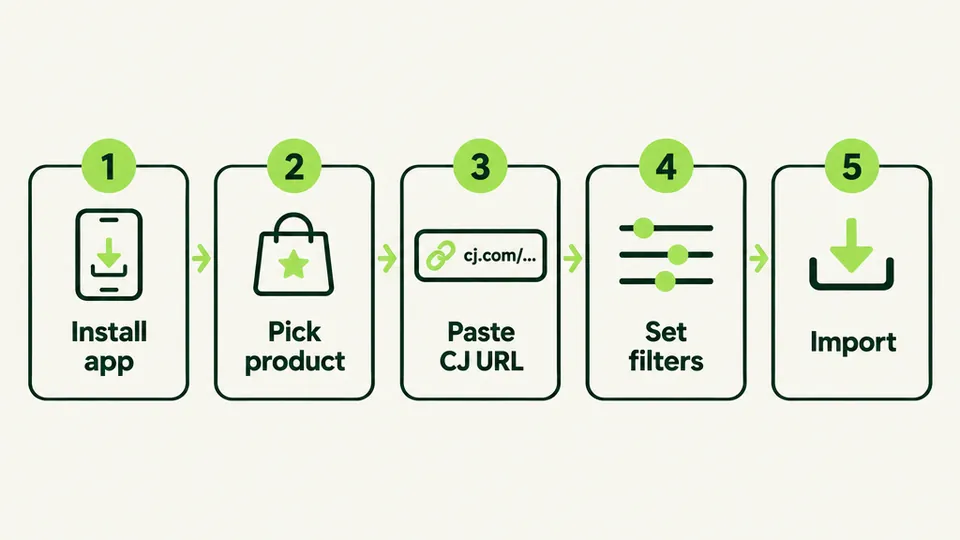
- Install WiseReviews from the Shopify App Store and open Reviews, then Import reviews.
- Choose Product reviews, then Pick a product and select the matching Shopify product.
- Paste the full CJdropshipping product page URL into Product URL. Validation can take up to 60 seconds.
- Set filters (all ratings or a star filter), how many reviews to pull, and how reviewer names should display.
- Confirm you have permission to use the reviews, then click Import and wait for the progress bar to finish.
Budget a few minutes per product on the first pass while you learn filters and name display settings. After that, the mapping pattern repeats. On WiseReviews Free you can hold up to 100 published reviews at a time, and marketplace URL plus Chrome extension imports share a lifetime 300 allowance that deletes do not refund. That is enough to seed top sellers. Standard adds auto-sync up to 50,000 reviews. Plus removes the review cap and adds bulk multi-URL workflows for larger catalogs. CSV uploads do not spend the lifetime 300 allowance; they still count toward the hold limit.
If URL validation fails, confirm you are on a CJdropshipping product detail page (not a search result or category grid), the link is complete, and the product still has public reviews. Do not switch to a Temu-style extension flow just because an old blog said every marketplace needs one.
Work product by product for the first session. Import your top sellers, publish, check the storefront theme, then continue. Rushing fifty SKUs before you verify widgets is how stores end up with reviews on the wrong handles.
How Do You Import CJdropshipping Reviews with CJ's CSV Export?
Yes. Export from the Buyer Reviews tab, add your Shopify product handle, then upload into any review app that accepts CSV. This is the method competitors push hardest, and it is still the best option when you want curation, translations, or a spreadsheet audit trail.
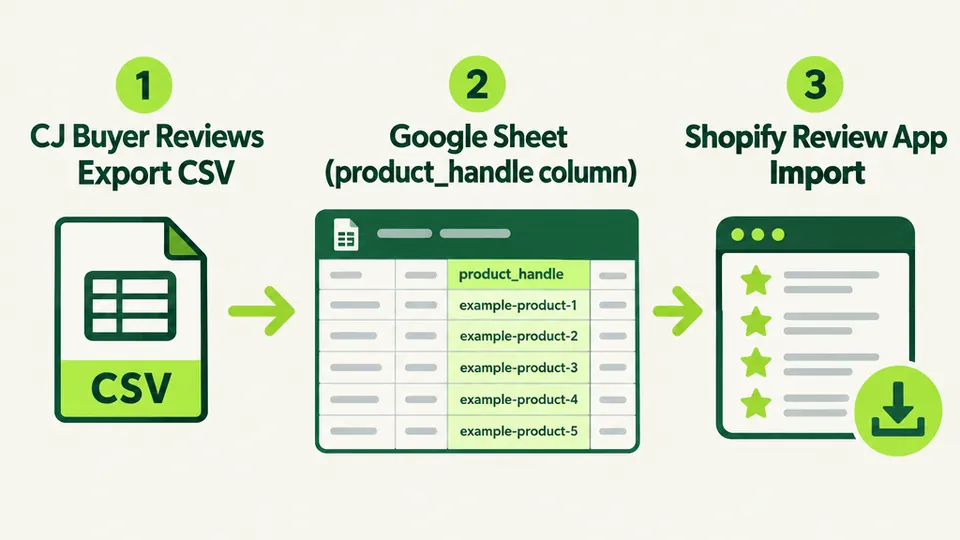
A practical CJ CSV workflow (aligned with Judge.me and CJ's own guidance):
- Open the CJdropshipping product page, go to Buyer Reviews, and click Export reviews.
- Import the file into Google Sheets. Add the Shopify product handle for every row (the slug after /products/ in your storefront URL).
- Do not rearrange CJ's columns beyond filling product_handle. Wrong handles are the most common import failure.
- Download as CSV, then upload in your review app. In WiseReviews, CSV import lives under Reviews, then More actions, then Import via CSV. Required fields include product handle, rating, review date, and reviewer name. Keep each file at or under 3,000 rows.
- Spot-check one product page, hide CJ-only shipping or voucher praise that will confuse Shopify shoppers, then publish.
In WiseReviews, CSV imports count toward the hold limit but do not spend the Free plan's lifetime 300 marketplace/extension allowance. That makes CSV useful when you have already used URL imports heavily on Free and still need a curated batch.
CSV is the right method when you want surgical control: only 4- and 5-star reviews, only photo reviews, or only English text for an English storefront. It is slower than URL paste if you have hundreds of reviews per SKU and no time to edit sheets. CJ's export still beats Wish and Temu here because you start from a real file instead of copy-paste.
The same CSV mindset shows up in our Tokopedia review import walkthrough and Temu review import walkthrough, with different source quirks. Amazon sellers can compare notes with our Amazon review import walkthrough.
How Do You Import CJdropshipping Reviews with Another Review App?
Use a Shopify app that documents CJdropshipping under Works with, features, or help docs, then follow that app's CJ steps. Judge.me's free CSV path is the best-documented alternative. Air Product Reviews adds a paste-URL option for CJ review links. LAI markets an on-page extension button for bulk CJ pulls.
This is method three for sellers who already run Judge.me, Air, or LAI, who need that app's widget stack, or who hit a free-tier ceiling elsewhere. Install the app, confirm CJ on the live plan, then follow its CJ docs. Confirm CJ on the live listing or help doc before you pay.
Do not treat "free review importer" as a synonym for CJ support. Many AliExpress-first tools never list CJdropshipping. Paying for the wrong app wastes a week. Paying for an app that names CJ is usually cheaper than rebuilding trust from zero.
Also note Shopify's own Product Reviews app was removed on May 6, 2024. Judge.me still accepts that deprecated CSV profile as an import format, which is why CJ export guides mention it. You are not installing Shopify's retired app. You are matching a CSV shape.
What Should You Do After You Import CJdropshipping Reviews to Shopify?
Imported reviews only help if shoppers can see them, trust them, and keep adding new ones after launch. Treat the import as day-one seed data, not the whole review strategy.
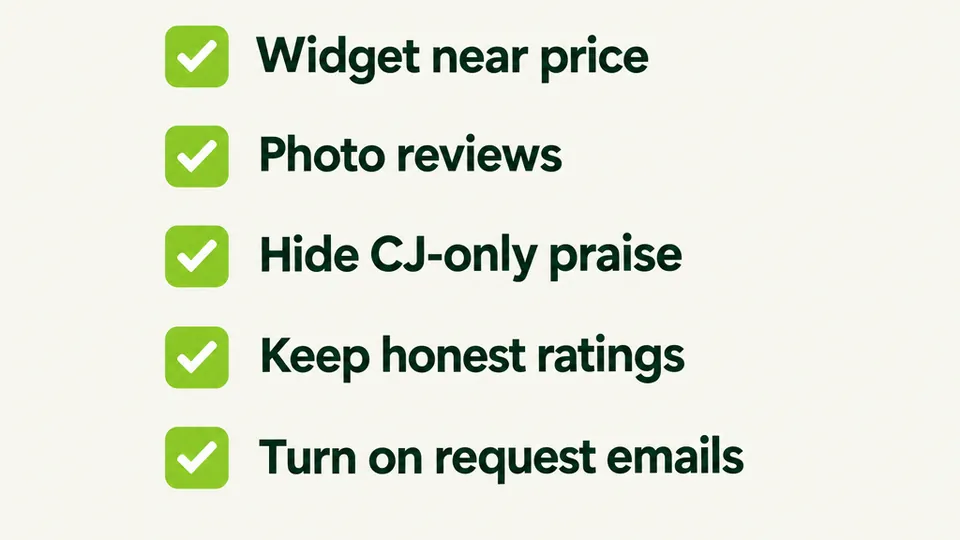
Do these post-import checks:
- Widget placement: put star summaries near the price and the full review block high enough on mobile that shoppers do not miss it.
- Photo priority: import media when the CJ source has it, and keep those photos near the buy box. Our photo vs text reviews breakdown explains why visual proof wins for discovery products.
- Marketplace leftovers: hide reviews that only praise CJ shipping speed, warehouse vouchers, or supplier chat that does not exist on Shopify.
- Moderation: keep ratings honest. Do not delete every critical review. Shoppers distrust perfect 5.0 averages, and Spiegel's peak band sits between 4.0 and 4.7 stars.
- Request emails: turn on post-purchase review request emails so imported CJ ratings are not your only source of truth.
Start with your top ten revenue SKUs, not the entire long tail. Shoppers hit bestsellers first, and that is where empty review sections cost the most. Once those pages convert, expand in weekly batches so moderation stays manageable.
If you want the conversion case in more depth, read how product reviews increase Shopify conversion rates. Measure the import like any other conversion change: compare add-to-cart and purchase rate on seeded products against unreviewed control SKUs for two weeks. If the lift is weak, fix widget placement and photo coverage before you buy a higher plan for bulk sync.
A hybrid launch works well for CJ-heavy catalogs: keep sourcing from CJ, seed Shopify hero products, and shift paid traffic only after Shopify conversion looks healthy. Imported reviews are the bridge, not the permanent strategy. Shopee sellers can compare the extension-heavy path in our Shopee review import walkthrough.
What Legal and Ethical Rules Apply to CJdropshipping Review Imports?
Import only reviews written about products you sell, keep the text and ratings unedited, and attribute reviewers honestly. Treat marketplace reviews as someone else's words you are republishing, not as content you own by default.
Practical rules that keep you out of trouble:
- Import reviews for your own products, not competitor listings you do not sell.
- Do not rewrite negative reviews or inflate star ratings.
- Do not invent "Verified buyer" badges for imported marketplace reviews unless your app and local law support that claim. Judge.me explicitly does not verify CJ imports.
- Remove a review quickly if the original reviewer asks.
- Follow your review app's permission checkbox and CJdropshipping's terms for content reuse in your market.
Large-scale scraping of CJ pages sits in a policy gray area under marketplace terms. Keep risk lower by sticking to your own products, using CJ's export or a documented importer, and leaving the content intact. The FTC Consumer Reviews and Testimonials Rule (in effect since October 21, 2024) targets fake, bought, and misleading reviews. Do not present imported marketplace reviews as if they were written by Shopify customers if your badges imply that. If you sell in the EU or handle regulated categories, talk to counsel before high-volume automation.
One sequencing tip: import reviews after products exist on Shopify, not before. Review apps need a real product handle or product picker target. Finish titles, images, and handles from your catalog move first, then run the review import so you do not remap everything twice.
Bottom line: CJdropshipping will not push reviews into Shopify for you, but you usually get both a URL paste path and a real Buyer Reviews export. Use a product URL on a capable review app, CJ's CSV plus handle mapping, or another importer that documents CJ. Seed your bestsellers, keep the text honest, then collect new Shopify reviews so the store does not depend on CJ forever.

WiseReviews ‑ Reviews Importer
SponsoredImport Photo & Video Reviews from your favorite e-commerce platforms easily!
Related Articles

How to Import Reviews from Wish to Shopify (3 Methods That Work)
Learn how to import reviews from Wish to Shopify with 3 methods that work: product URL paste, a curated CSV upload, and paid Wish review importer apps.

How to Import Reviews from Tokopedia to Shopify (3 Methods That Work)
Learn 3 ways to import reviews from Tokopedia to Shopify: URL import, CSV, and a hybrid launch plan. Keep marketplace social proof ready on launch day.

How to Import Reviews from Temu to Shopify (3 Methods That Work)
Learn how to import Temu reviews to Shopify with 3 methods that work: Chrome extension for CAPTCHA, curated CSV upload, and paid Temu review importer apps.

How to Import Reviews from Amazon to Shopify (3 Methods That Work)
Learn how to import Amazon reviews to Shopify with 3 methods that work: Chrome extension for CAPTCHA pages, CSV upload, and paid Amazon importer apps.

How to Import Reviews from Lazada to Shopify (3 Methods That Work)
Learn 3 ways to import reviews from Lazada to Shopify, including URL import and a free CSV path. Keep Lazada social proof ready on Shopify launch day.

How to Import Reviews from Shopee to Shopify (3 Methods That Actually Work)
Learn 3 ways to import reviews from Shopee to Shopify, including a completely free method. Don't rebuild your social proof from scratch after migrating.