
How to Import Products from Daraz to Shopify (3 Methods That Work)
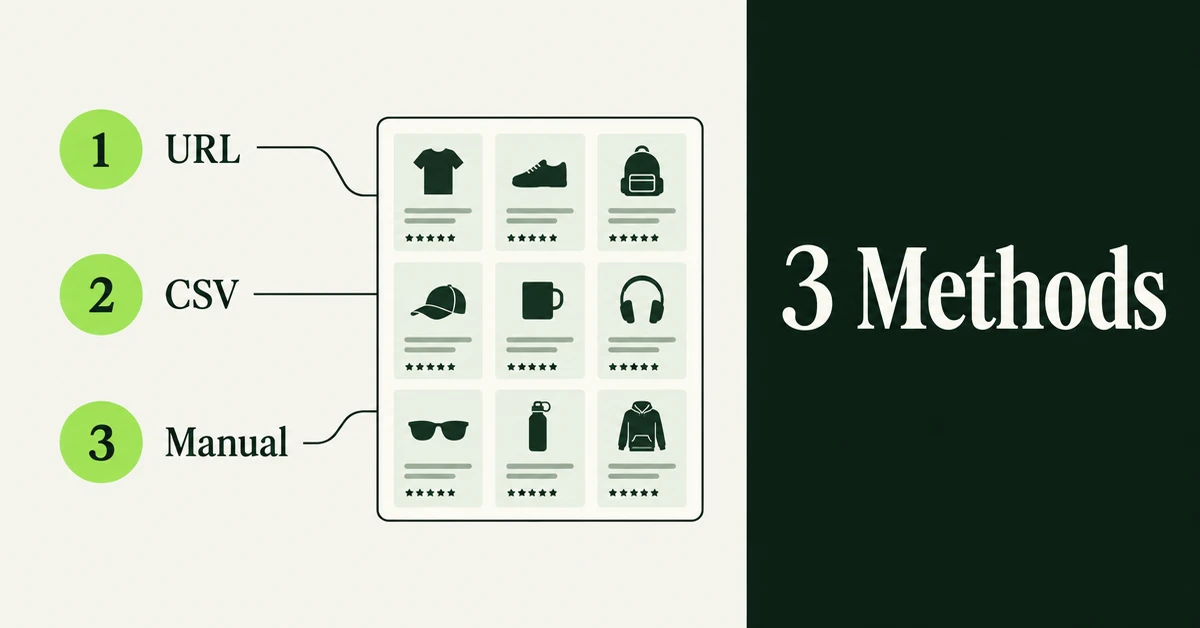
If your catalog already lives on Daraz and you are opening a Shopify store, the boring part is not finding products. It is rebuilding titles, images, and variants by hand. You can import products from Daraz to Shopify with a URL import app, a Shopify CSV upload, or careful manual copy. This guide walks through all three so you can pick the path that matches your catalog size and how much cleanup you are willing to do.
Pakistan's e-commerce market reached US$7.7 billion in total volume in 2024, with retail e-commerce alone at about US$5.4 billion. Traffic rankings for June-August 2024 still put Daraz first among shopping sites in Pakistan, ahead of Amazon and OLX. Owning a Shopify storefront means you stop renting every customer relationship from a marketplace algorithm. If you are also planning an Amazon product catalog move or an Etsy to Shopify product migration, the same discipline applies: import first, then rewrite for Google.
Why Do Daraz Sellers Move Product Catalogs to Shopify?
Most Daraz sellers open Shopify to own the customer list, control branding, and sell outside marketplace fee pressure. They are rarely abandoning Daraz in week one.
Running both channels is normal. Daraz keeps discovery traffic across Pakistan, Bangladesh, Nepal, Sri Lanka, and Myanmar country sites, while Shopify becomes the place you send email, SMS, and paid traffic you paid for yourself. A clean Shopify catalog lets you price for margin instead of racing every sponsored listing.
There is also a practical ops reason. Marketplace listings are written for marketplace search. Shopify pages need longer descriptions, unique handles, and image sets that work without Daraz gallery rules. Importing the product shell saves hours. Rewriting the copy is still your job.
Another quiet reason is inventory truth. On Daraz, stock can look fine while your warehouse, 3PL, or other marketplaces tell a different story. Shopify becomes the system of record once you sell on more than one channel. That only works if the products you import are the same SKUs you actually fulfill.
Hot take: the tool that pastes a Daraz URL into Shopify is not the competitive advantage. The sellers who win treat that import as a draft, then rewrite pricing, titles, and descriptions for Google and their own brand voice before publishing.
Can You Export a Product CSV Directly From Daraz Seller Center?
Daraz Seller Center is built for listing and order management on the marketplace. It does not hand you a ready-to-upload Shopify product CSV. Order reports can export as CSV, but product and inventory data still need remapping before Shopify will accept the file.
That gap is why most merchants either paste Daraz product URLs into an importer or rebuild a Shopify-format spreadsheet. Shopify's own importer expects its template headers, and a mismatched Daraz export will fail or create half-empty products. If you already live in spreadsheets, our walkthrough on importing products to Shopify from a CSV without errors covers the failure modes before you hit Upload.
Also set expectations early: product migration tools move catalog data. They do not move customers, orders, or reviews. Treat products and social proof as two migrations with two tools, not one checkbox.
If your seller export is missing image URLs or variant relationships, do not force the CSV path. Switch to a URL importer for those SKUs and use CSV only for fields you can verify in a spreadsheet.
How Do You Import Products From Daraz to Shopify With a URL Import App?
URL import is the fastest path when you already have Daraz product page links. Paste each URL, preview the listing, then push it into Shopify as a draft or active product.
Migratify lists Daraz among supported sources and treats Daraz as a public URL import, not a captcha-gated extension flow. Per Migratify's URL import docs, Shopify stores, Amazon, Etsy, Lazada, Daraz, BigCommerce, and many other public sites work by pasting a link. Shopee and AliExpress need the Chrome extension instead because those sites block direct fetches.
Here is the practical sequence:
- Install the app from the Shopify App Store and open the Import page.
- Paste Daraz product URLs into the Product URL card. Use the + control to queue several links in one run. Country domains matter (daraz.pk, daraz.com.bd, daraz.com.np, daraz.lk, daraz.com.mm), so copy the link from the exact market you sell in.
- Wait for validation and preview. Confirm title, images, variants, and price look right before you commit.
- Set import settings (draft vs active, inventory tracking, collection, optional Magic Edit prompt).
- Start migration and let it finish on the app's servers. Only one import runs at a time.
Plan limits matter if you are testing. Migratify's Free plan allows up to 5 products in total (not per month). Standard is $14/month with unlimited imports, and Plus is $29/month for heavier Magic Edit usage. The App Store listing matches those Free / $14 / $29 tiers. Migratify also requires a paid Shopify plan; stores still on Shopify's trial need to upgrade before importing.
What usually comes across: title, description, images (with variant images when the source provides them), options, price and compare-at price, SKU and barcode, tags (up to 30 per product), vendor, and product type. Videos on the source page are not imported, and Migratify does not import customers, orders, or reviews.
Use a direct Daraz product page URL, not a search result, category page, or cart link. If validation fails, re-copy the URL from the product page address bar and try again before flipping Skip validation. Skip validation is for cases where you already know the link is correct and the preview is the problem, not the shortcut for every import.
Other Shopify importers often lean on a Chrome extension for marketplace pages. That works too, but for Migratify specifically you should stay on the URL card for Daraz and reserve the extension for captcha-protected sites. We compared broader tool choices in our roundup of the best Shopify store migration apps.
How Do You Move Daraz Products to Shopify Using a CSV File?
CSV is the right method when you need bulk control, custom metafields, or a catalog too large to paste URL by URL. You build a Shopify product CSV, then upload it from Products > Import.
Shopify's official docs are clear on the hard limits: your product CSV cannot exceed 15 MB, and for new products the Title column is required (Handle is also required when you add variants). Image URLs must be publicly reachable over HTTPS. Keep every variant row for a product under the same Handle, or Shopify will split the family. You can add up to 250 images per product through the CSV image fields when those URLs are public.
Suggested workflow:
- Gather whatever product data you can from Seller Center, a seller API export, or a structured scrape you are licensed to use.
- Open Shopify's sample product CSV and copy only the headers you need.
- Map source columns to Shopify fields: Title, Body (HTML), Vendor, Type, Tags, Option names/values, Variant SKU, Variant Price, Image Src.
- Convert prices and currencies carefully. Daraz country sites price in PKR, BDT, NPR, LKR, or MMK; your Shopify store may sell in USD or another currency.
- Strip marketplace boilerplate from descriptions (shipping promises, Mall badges, seller chat CTAs, COD-only claims).
- Upload under Products > Import, review the preview, then import.
CSV imports cannot be canceled once they start, and Shopify does not keep a friendly import history for rollback. Test five variant-heavy SKUs first. If the file is over 15 MB, split it and keep parent/variant/image rows together by Handle.
One more CSV trap: sorting the file in Excel can reorder rows and break which image belongs to which variant. If you need to filter, do it carefully and re-sort back into Handle groups before upload. When an option value changes on an existing product during CSV update, Shopify can recreate variants and break apps that stored the old variant IDs. Prefer creating new products cleanly, then editing in admin for small fixes.
When Does Manual Copy Make More Sense Than an Importer?
Manual copy is slower, but it wins when you only need a handful of hero SKUs rewritten for SEO. Paste nothing wholesale. Rebuild the page as a Shopify product.
Use manual entry when:
- You are launching with fewer than about 20 SKUs and every page needs unique copy.
- The Daraz listing is thin, keyword-stuffed, or written in a language you will not sell in.
- Variants on Daraz do not map cleanly to Shopify's three option dimensions.
- You care more about Google ranking than speed of catalog transfer.
Manual does not mean starting from a blank page with no research. Keep the Daraz listing open, reuse accurate specs, download your own product photos, and write a 300 to 600 word description aimed at search queries Daraz never ranks for. That is the same rewrite discipline we recommend after an Amazon catalog import.
A hybrid works well for mid-size catalogs: URL-import everything as drafts, then manually rewrite the top 10% of SKUs by revenue before you publish them. Leave the long tail as drafts until you have time, or until paid ads need those URLs live.
What Product Data Usually Transfers, and What Does Not?
Expect the product shell to move. Do not expect marketplace-only assets or non-product data to follow.
Usually transfers with a URL importer: title, description HTML, image set, variant options, prices, SKUs/barcodes when present, vendor, type, and a limited tag set.
Often needs hand work: SEO title and meta description, collection membership beyond a single destination collection, inventory quantities by location, weight/shipping profiles, and metafields your theme depends on.
Does not transfer via Migratify: customers, orders, reviews, gift cards, store settings, and source-page videos. Collections are not imported as objects either, though you can drop imported products into one existing manual collection during import settings.
Shopify raised the per-product variant ceiling to 2,048 variants for all merchants on October 15, 2025, but you still only get three option names per product. If a Daraz listing uses four attributes, split the product or demote one attribute to a metafield before you publish.
Also remember that Migratify imports products only. If your migration brief still lists customers or order history, use Shopify's native customer CSV tools or a dedicated full-store migration service for those pieces. Do not expect a product importer to become a platform clone.
What Should You Clean Up After a Daraz to Shopify Product Import?
Publish nothing until you finish a cleanup pass. Marketplace imports create drafts that look finished and still convert poorly.
Run this checklist on a sample of imported products:
- Handles: Replace auto-generated slugs that include Daraz junk or duplicate titles.
- Pricing: Confirm currency conversion, compare-at price, and margin after Shopify payments fees.
- Images: Drop low-res marketplace shots, set alt text, and attach the right image to each variant.
- Copy: Remove Daraz-only phrases, add specs shoppers ask about, and write for Google.
- Inventory: Turn on tracking only when your numbers are real; do not invent stock from a stale Daraz snapshot.
- Duplicates: Search for near-identical titles created when you imported the same SKU twice.
For a deeper cleanup playbook covering duplicates, tags, and broken variants, use how to clean up product data after a Shopify migration. If you also need a BigCommerce-style platform move later, the same cleanup habits show up in our BigCommerce to Shopify migration guide.
Spot-check mobile product pages too. Marketplace image crops and long pasted descriptions often look fine on desktop and broken on phones. Fix the first screen of the PDP before you spend money driving traffic.
Should You Keep Selling on Daraz After You Launch Shopify?
Yes, for most catalogs. Daraz still drives discovery in South Asia, and shutting it off on launch day usually cuts revenue before Shopify SEO and ads catch up.
Run both channels with clear rules:
- Keep Daraz for demand you did not create.
- Send owned traffic (email, social, brand search) to Shopify.
- Sync inventory carefully so one channel cannot oversell the shared pool.
- Differentiate Shopify copy so Google has a reason to rank your domain instead of a marketplace mirror.
When the Shopify store starts converting paid and organic traffic on its own, you can prune weak Daraz SKUs. Until then, treat Daraz as a channel and Shopify as the brand home.
If your next move is another marketplace catalog, the same three-method pattern applies. Paste URLs when the source is public, use CSV when you need bulk control, and rewrite hero products by hand when SEO matters more than speed. For a same-platform copy job, see how to migrate products from one Shopify store to another.

Migratify: Copy Products + AI
SponsoredProduct import made easier! Effortlessly migrate products from 100+ platforms.
Related Articles
How to Migrate Products from One Shopify Store to Another (3 Methods That Work)
Migrate products from one Shopify store to another with CSV, a URL importer, or a bulk spreadsheet. Keep images intact and know what will not transfer.
Amazon to Shopify Migration: How to Move Your Product Catalog (Without Losing Data)
Planning an Amazon to Shopify migration? Learn how to export listings, map ASINs to SKUs, and move variants, images, and FBA inventory without data loss.
Etsy to Shopify Migration: How to Move Your Products and Keep Your Listings
An Etsy to Shopify migration requires more than moving products. Use this checklist to transfer listings, protect your SEO, and launch your store right.

BigCommerce to Shopify Migration: The Complete Step-by-Step Guide
Planning a BigCommerce to Shopify migration? This step-by-step guide covers exports, 301 redirects, variant limits, real costs, timelines, and SEO safety.

How to Import Products to Shopify from a CSV File (Without Errors)
Learn how to import products to Shopify from a CSV file without errors. Covers formatting, variants, images, and detailed fixes for every common issue.

Best Shopify Store Migration Apps in 2026: Tested, Compared, and Ranked
Not all Shopify store migration apps handle SEO, orders, and reviews the same way. Compare the top-rated tools so you migrate without losing any data.